

QuantFactory/SauerkrautLM-1.5b-GGUF
This is quantized version of VAGOsolutions/SauerkrautLM-1.5b created suing llama.cpp
Model Description
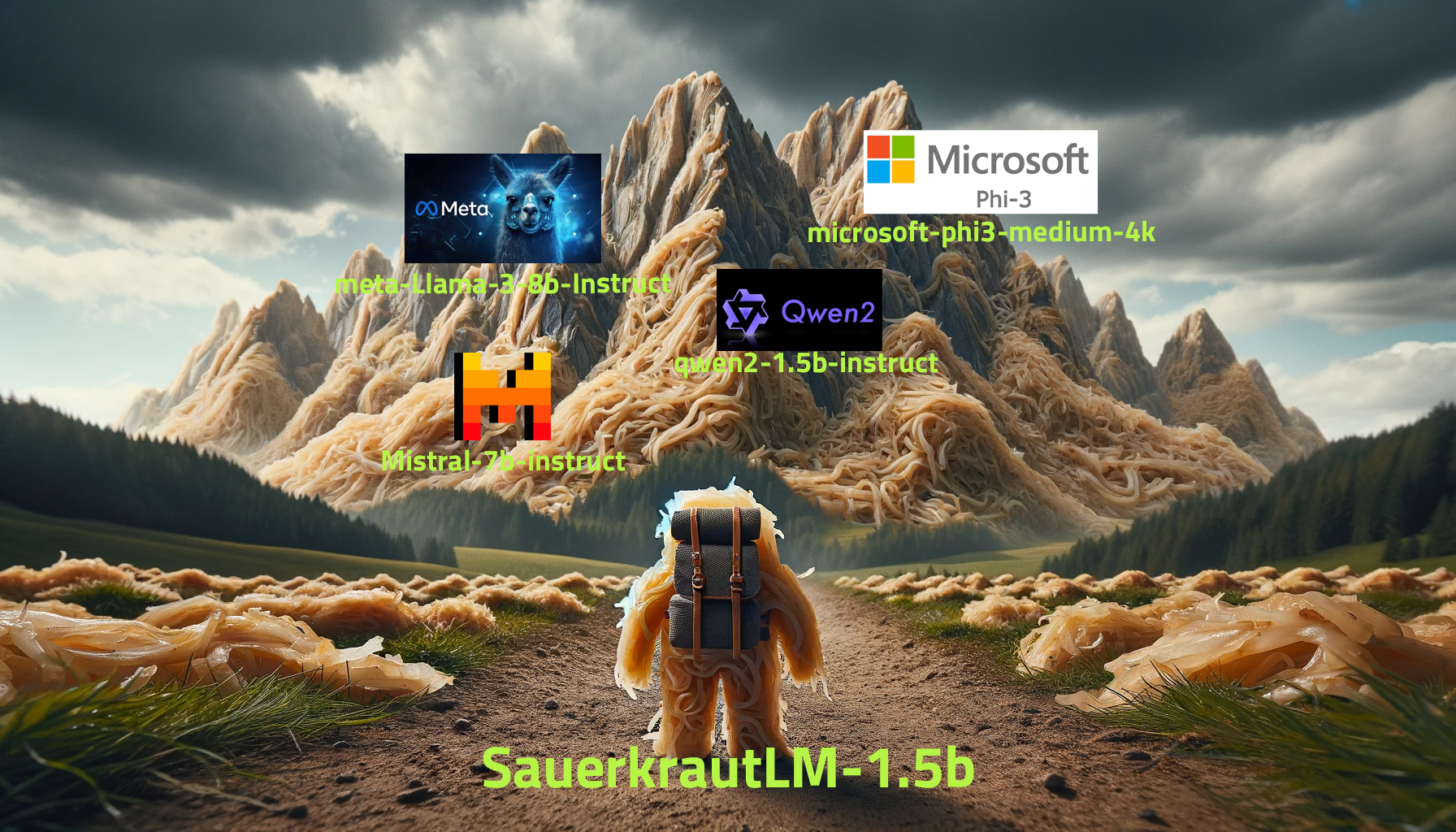
VAGO solutions SauerkrautLM-1.5b
DEMO Model - to showcase the potential of resource-efficient Continuous Pre-Training of Large Language Models using Spectrum CPT
Introducing SauerkrautLM-1.5b – our Sauerkraut version of the powerful Qwen/Qwen2-1.5B!
- Continuous Pretraining on German Data with Spectrum CPT (by Eric Hartford, Lucas Atkins, Fernando Fernandes Neto and David Golchinfar) targeting 25% of the layers.
- Finetuned with SFT
- Aligned with DPO
Table of Contents
- Overview of all SauerkrautLM-1.5b
- Model Details
- Evaluation
- Disclaimer
- Contact
- Collaborations
- Acknowledgement
All SauerkrautLM-1.5b
Model Details
SauerkrautLM-1.5b
- Model Type: SauerkrautLM-1.5b is a finetuned Model based on Qwen/Qwen2-1.5B
- Language(s): German, English
- License: Apache 2.0
- Contact: VAGO solutions
Training Procedure
This model is a demo intended to showcase the potential of resource-efficient training of large language models using Spectrum CPT. Here's a brief on the procedure:
Continuous Pre-training (CPT) on German Data:
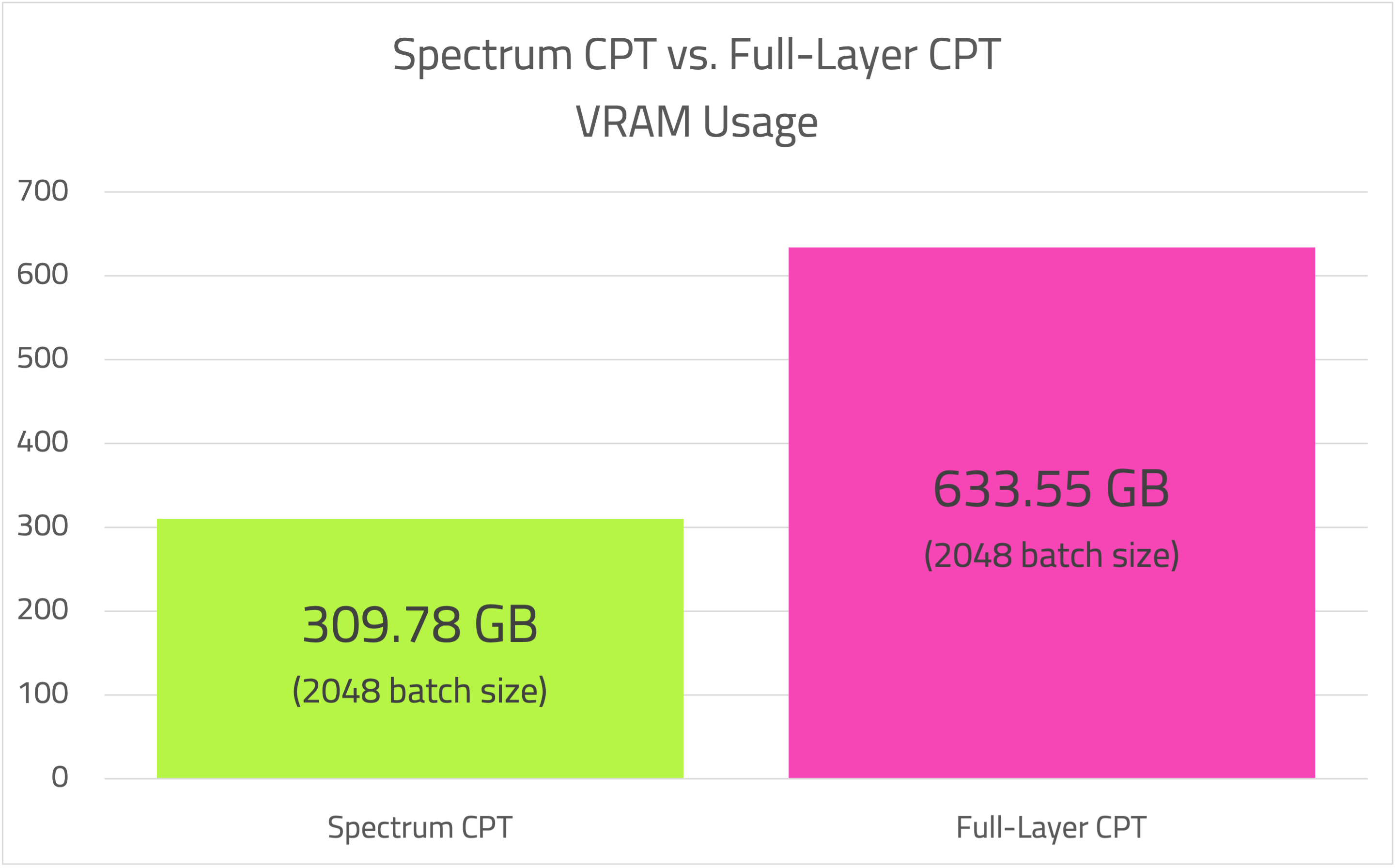
Utilizing Spectrum by Eric Hartford, Lucas Atkins, Fernando Fernandes Neto, and David Golchinfar, the model targeted 25% of its layers during training. This approach allowed significant resource savings: Spectrum with 25% layer targeting consumed 309.78GB at a batch size of 2048. Full Fine-tuning targeting 100% of layers used 633.55GB at the same batch size. Using Spectrum, we enhanced the German language capabilities of the Qwen2-1.5B model via CPT while achieving substantial resource savings. Spectrum enabled faster training and cost reductions. By not targeting all layers for CPT, we managed to prevent substantial performance degradation in the model's primary language (English), thus markedly improving its German proficiency.
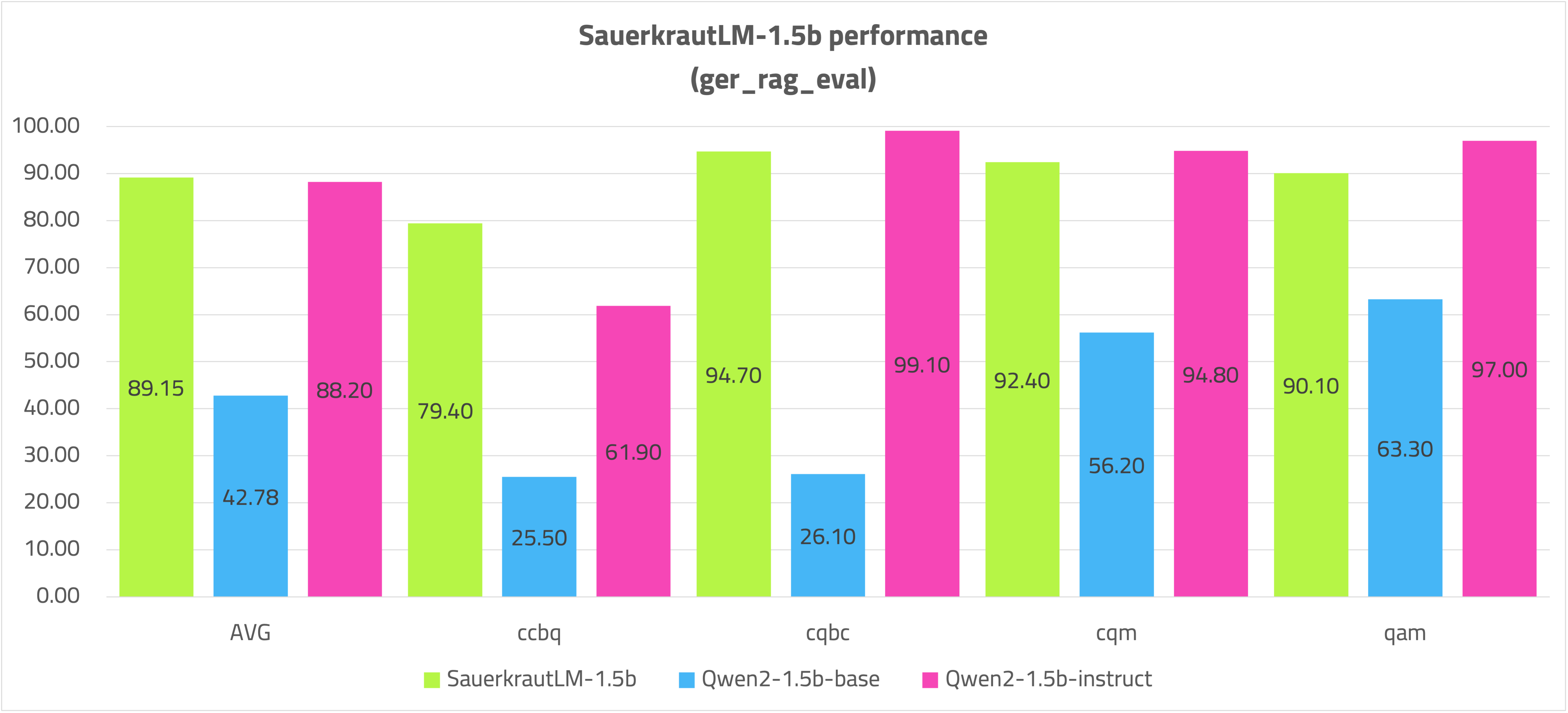
The model was further trained with 6.1 billion German tokens, costing $1152 GPU-Rent for CPT. In the German Rag evaluation, it is on par with 8 billion parameter models and, with its 1.5 billion parameter size, is well-suited for mobile deployment on smartphones and tablets.
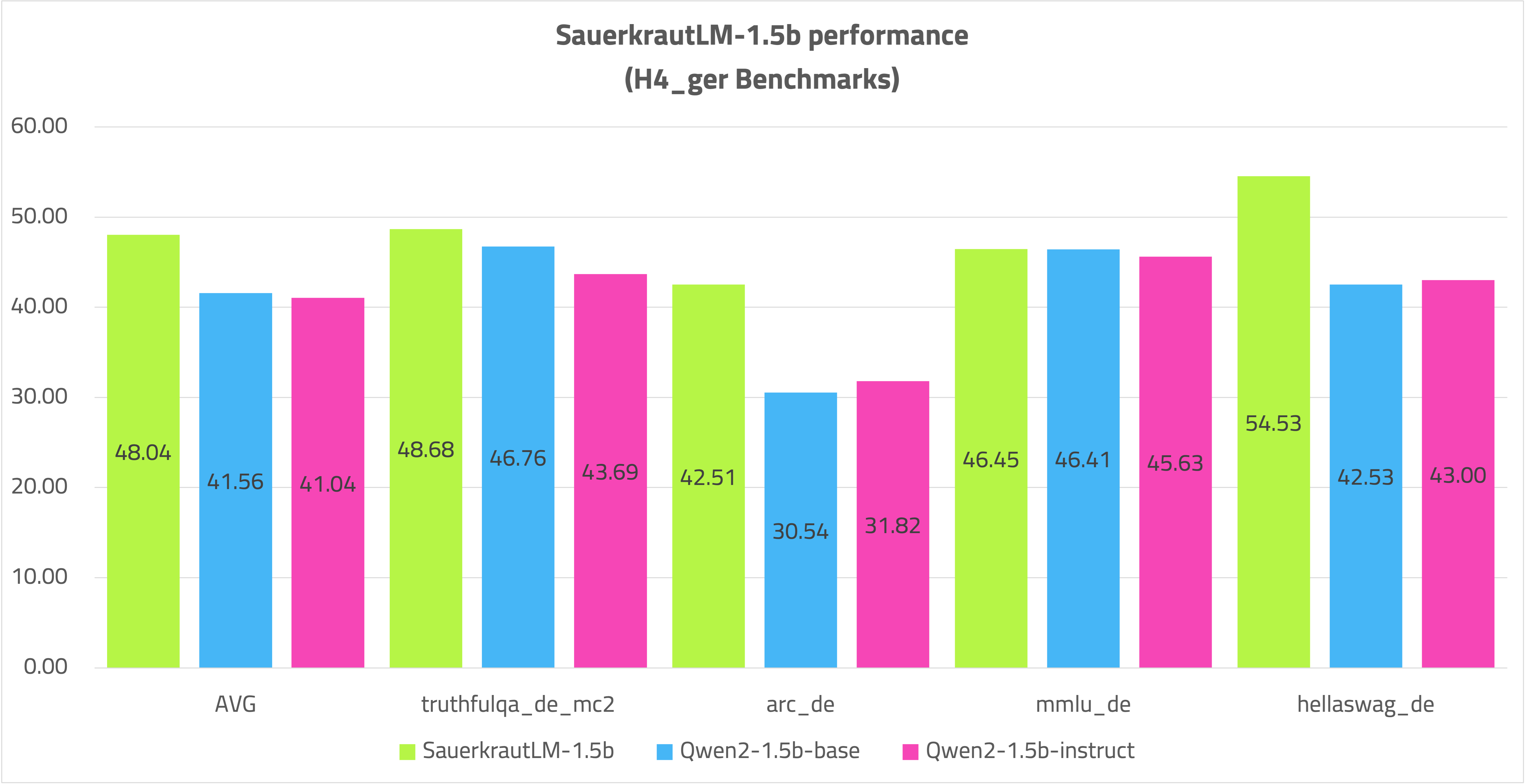
Despite the large volume of German CPT data, the model competes well against the Qwen2-1.5B-Instruct model and performs significantly better in German.
Post-CPT Training:
The model underwent 3 epochs of Supervised Fine-Tuning (SFT) with 700K samples.
Further Steps:
The model was aligned with Direct Preference Optimization (DPO) using 70K samples.
Objective and Results
The primary goal of this training was to demonstrate that with Spectrum CPT targeting 25% of the layers, even a relatively small model with 1.5 billion parameters can significantly enhance language capabilities while using a fraction of the resources of the classic CPT approach. This method has an even more pronounced effect on larger models. It is feasible to teach a model a new language by training just a quarter of the available layers.
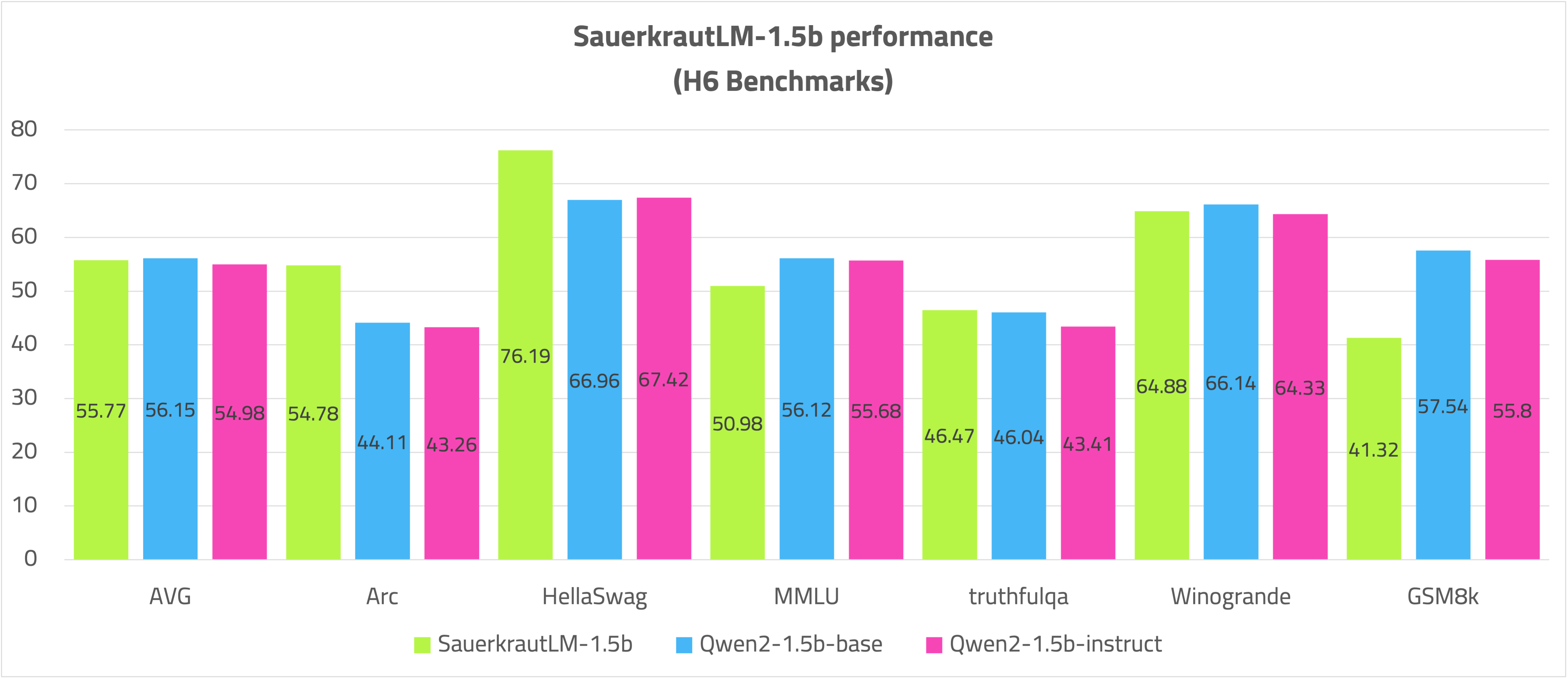
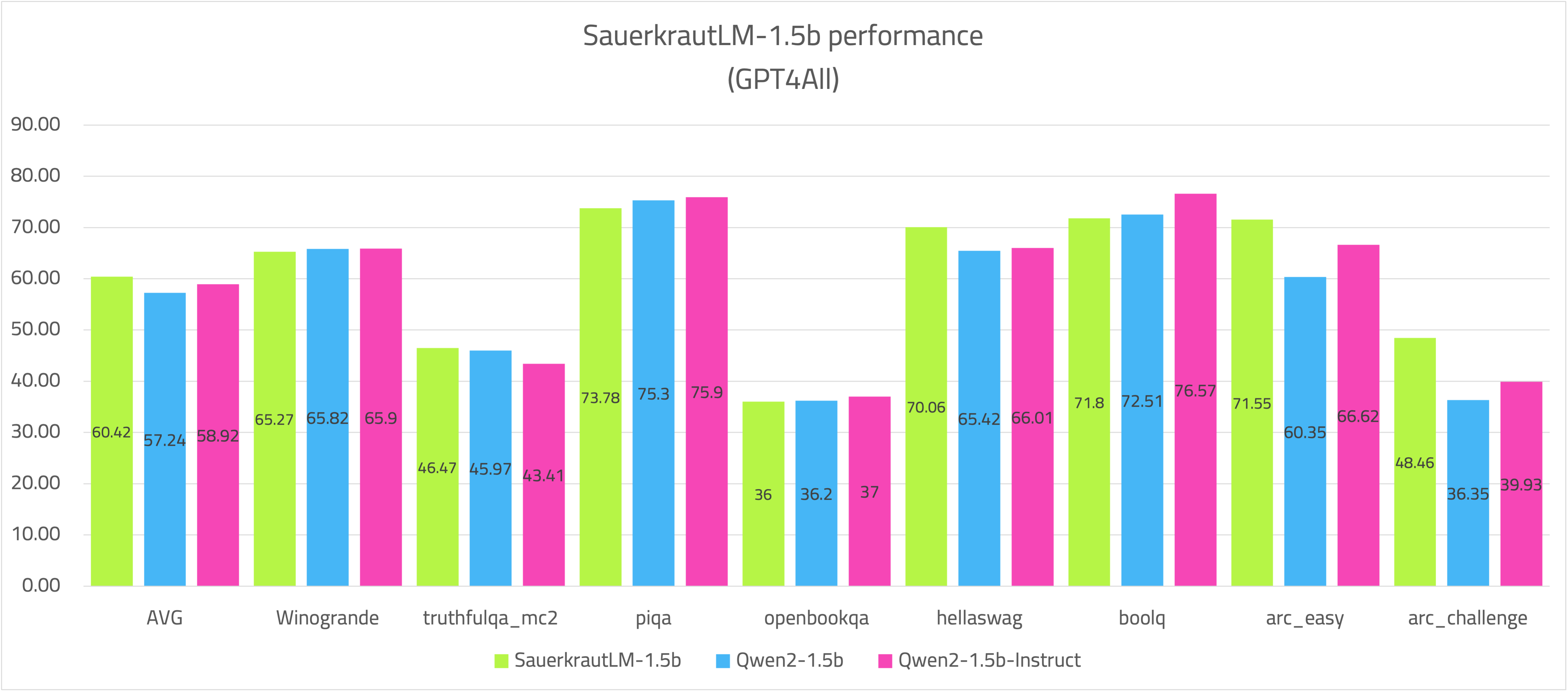
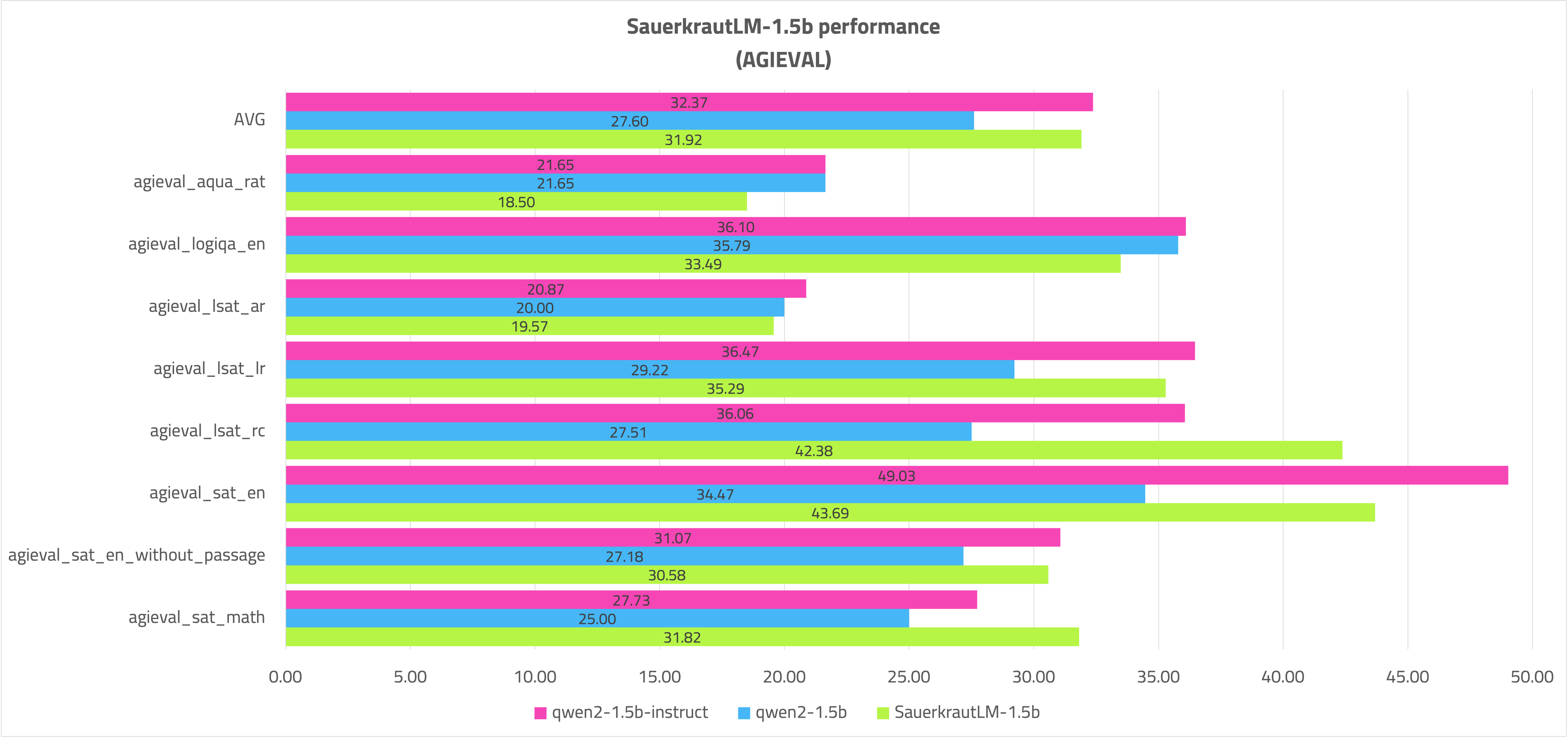
The model has substantially improved German skills as demonstrated in RAG evaluations and numerous recognized benchmarks. In some English benchmarks, it even surpasses the Qwen2-1.5B-Instruct model.
Spectrum CPT can efficiently teach a new language to a large language model (LLM) while preserving the majority of its previously acquired knowledge.
Stay tuned for the next big models employing Spectrum CPT!
NOTE
For the demo, the performance of the model is sufficient.
For productive use, more German tokens can be trained on the SauerkrautLM-1.5b as required in order to teach the model even firmer German while only having a relative influence on the performance of the model (25% of the layers).
The SauerkrautLM-1.5b offers an excellent starting point for this.
Evaluation
VRAM usage Spectrum CPT vs. FFT CPT - with a batchsize of 2048
Open LLM Leaderboard H6:
German H4
German RAG:
GPT4ALL
AGIEval
Disclaimer
We must inform users that despite our best efforts in data cleansing, the possibility of uncensored content slipping through cannot be entirely ruled out. However, we cannot guarantee consistently appropriate behavior. Therefore, if you encounter any issues or come across inappropriate content, we kindly request that you inform us through the contact information provided. Additionally, it is essential to understand that the licensing of these models does not constitute legal advice. We are not held responsible for the actions of third parties who utilize our models.
Contact
If you are interested in customized LLMs for business applications, please get in contact with us via our website. We are also grateful for your feedback and suggestions.
Collaborations
We are also keenly seeking support and investment for our startup, VAGO solutions where we continuously advance the development of robust language models designed to address a diverse range of purposes and requirements. If the prospect of collaboratively navigating future challenges excites you, we warmly invite you to reach out to us at VAGO solutions
Acknowledgement
Many thanks to Qwen for providing such valuable model to the Open-Source community.
- Downloads last month
- 244
2-bit
3-bit
4-bit
5-bit
6-bit
8-bit
Model tree for QuantFactory/SauerkrautLM-1.5b-GGUF
Base model
VAGOsolutions/SauerkrautLM-1.5b