
Transformers documentation
SuperPoint
このモデルは2017年12月20日にHF papersで公開され、2024年3月19日にHugging Face Transformersに貢献されました。

SuperPoint
SuperPointは、関心点検出と記述のための全畳み込みネットワークを自己教師あり学習した結果として得られたモデルです。このモデルは、射影変換下でも繰り返し検出可能な関心点を検出でき、各点に対して記述子を提供します。単独での利用には限界がありますが、射影推定や画像マッチングなどの他のタスクにおける特徴抽出器として利用できます。
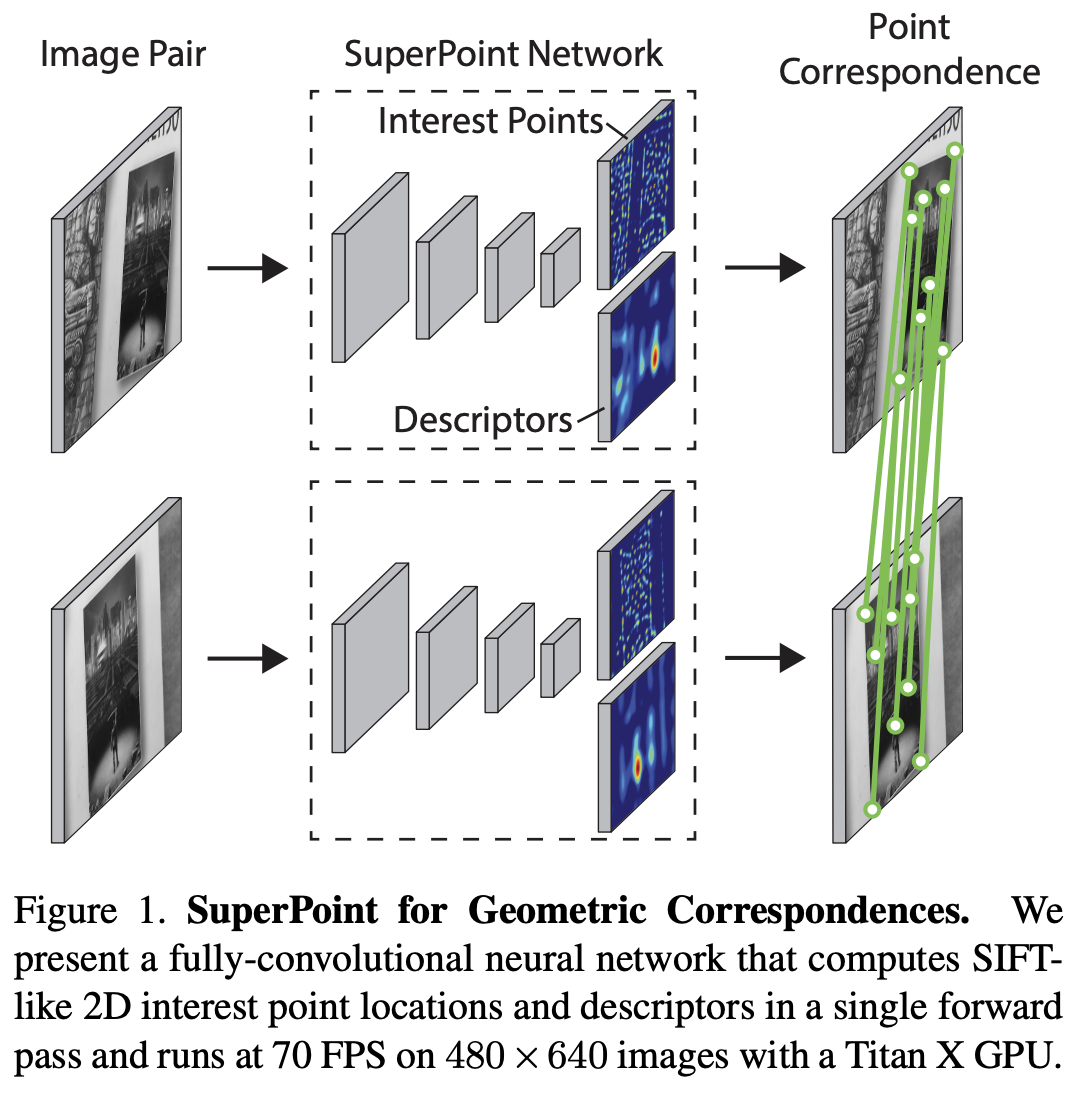
すべての SuperPoint の元のチェックポイントは、Magic Leap Community 組織の下で確認できます。
このモデルは stevenbucaille によって提供されました。
右側のサイドバーにあるSuperPointモデルをクリックすると、SuperPointをさまざまなコンピュータビジョンタスクに適用する方法の例をさらに確認できます。
以下の例では、AutoModel クラスを使用して画像内の興味のある点(interest points)を検出する方法を示しています。
import requests
import torch
from PIL import Image

from transformers import AutoImageProcessor, SuperPointForKeypointDetection


url = "http://images.cocodataset.org/val2017/000000039769.jpg"
image = Image.open(requests.get(url, stream=True).raw)

processor = AutoImageProcessor.from_pretrained("magic-leap-community/superpoint")
model = SuperPointForKeypointDetection.from_pretrained("magic-leap-community/superpoint", device_map="auto")

inputs = processor(image, return_tensors="pt").to(model.device)
with torch.no_grad():
    outputs = model(**inputs)

# Post-process to get keypoints, scores, and descriptors
image_size = (image.height, image.width)
processed_outputs = processor.post_process_keypoint_detection(outputs, [image_size])
注記
SuperPointは画像ごとに可変数のキーポイントを出力するため、可変長の特徴表現を必要とするタスクに適しています。
from transformers import AutoImageProcessor, SuperPointForKeypointDetection
import torch
from PIL import Image
import requests
processor = AutoImageProcessor.from_pretrained("magic-leap-community/superpoint")
model = SuperPointForKeypointDetection.from_pretrained("magic-leap-community/superpoint", device_map="auto")
url_image_1 = "http://images.cocodataset.org/val2017/000000039769.jpg"
image_1 = Image.open(requests.get(url_image_1, stream=True).raw)
url_image_2 = "http://images.cocodataset.org/test-stuff2017/000000000568.jpg"
image_2 = Image.open(requests.get(url_image_2, stream=True).raw)
images = [image_1, image_2]
inputs = processor(images, return_tensors="pt").to(model.device)
# Example of handling dynamic keypoint output
outputs = model(**inputs)
keypoints = outputs.keypoints  # Shape varies per image
scores = outputs.scores        # Confidence scores for each keypoint
descriptors = outputs.descriptors  # 256-dimensional descriptors
mask = outputs.mask # Value of 1 corresponds to a keypoint detection
モデルは、単一のフォワードパス内でキーポイントの座標とそれに対応するディスクリプタ(256次元ベクトル)の両方を提供します。
複数の画像をバッチ処理する場合、各画像に対応する情報を取得するためにmask属性を使用する必要があります。
SuperPointImageProcessorのpost_process_keypoint_detectionを使用して、各画像の情報を取得できます。# Batch processing example images = [image1, image2, image3] inputs = processor(images, return_tensors="pt").to(model.device) outputs = model(**inputs) image_sizes = [(img.height, img.width) for img in images] processed_outputs = processor.post_process_keypoint_detection(outputs, image_sizes)その後、選択した画像上にキーポイントを出力して、結果を視覚化できます。
import matplotlib.pyplot as plt
plt.axis("off")
plt.imshow(image_1)
plt.scatter(
    outputs[0]["keypoints"][:, 0],
    outputs[0]["keypoints"][:, 1],
    c=outputs[0]["scores"] * 100,
    s=outputs[0]["scores"] * 50,
    alpha=0.8
)
plt.savefig(f"output_image.png")

リソース
- 推論と可視化の例については、このノートブックを参照してください。
SuperPointConfig
クラス transformers.SuperPointConfig
< source >( transformers_version: str | None = Nonearchitectures: list[str] | None = Noneoutput_hidden_states: bool | None = Falsereturn_dict: bool | None = Truedtype: str | torch.dtype | None = Nonechunk_size_feed_forward: int = 0is_encoder_decoder: bool = Falseid2label: dict[int, str] | dict[str, str] | None = Nonelabel2id: dict[str, int] | dict[str, str] | None = Noneproblem_type: Literal['regression', 'single_label_classification', 'multi_label_classification'] | None = Noneencoder_hidden_sizes: list[int] | tuple[int, ...] = (64, 64, 128, 128)decoder_hidden_size: int = 256keypoint_decoder_dim: int = 65descriptor_decoder_dim: int = 256keypoint_threshold: float = 0.005max_keypoints: int = -1nms_radius: int = 4border_removal_distance: int = 4initializer_range: float = 0.02 )
パラメータ
- encoder_hidden_sizes (
List、任意、デフォルトは[64, 64, 128, 128]) — エンコーダー内の各畳み込み層のチャネル数です。 - decoder_hidden_size (
int、任意、デフォルトは256) — 隠れ表現の次元数。 - keypoint_decoder_dim (
int, 任意、デフォルト値は 65) — キーポイントデコーダーの出力次元数。 - descriptor_decoder_dim (
int, 任意、デフォルトは 256) — ディスクリプタデコーダーの出力次元数。 - keypoint_threshold (
float、任意、デフォルト値は 0.005)— キーポイントの抽出に使用する閾値です。 - max_keypoints (
int、任意、デフォルト値は -1) — 抽出するキーポイントの最大数。-1の場合、すべてのキーポイントが抽出されます。 - nms_radius (
int, 任意、デフォルトは 4) — 非最大値抑制の半径です。 - border_removal_distance (
int、任意、デフォルトは 4) — キーポイントを削除する境界からの距離です。 - initializer_range (
float、任意、デフォルトは0.02) — すべての重み行列を初期化するための truncated_normal_initializer の標準偏差です。
これは SuperpointModel の設定を保存するための設定クラスです。指定された引数に基づいて Superpoint モデルをインスタンス化し、モデルのアーキテクチャを定義するために使用されます。デフォルト値で設定をインスタンス化すると、magic-leap-community/superpoint と同様の設定が得られます。
設定オブジェクトはPreTrainedConfigを継承し、モデルの出力を制御するために使用できます。詳細については、PreTrainedConfigのドキュメントを参照してください。
例:
>>> from transformers import SuperPointConfig, SuperPointForKeypointDetection

>>> # Initializing a SuperPoint superpoint style configuration
>>> configuration = SuperPointConfig()
>>> # Initializing a model from the superpoint style configuration
>>> model = SuperPointForKeypointDetection(configuration)
>>> # Accessing the model configuration
>>> configuration = model.config
SuperPointImageProcessor
class transformers.SuperPointImageProcessor
< source >( **kwargs: *<class 'transformers.models.superpoint.image_processing_superpoint.SuperPointImageProcessorKwargs'> )
パラメータ
- do_convert_rgb (
bool、kwargs、任意) — 画像を RGB に変換するかどうかを指定します。 - do_resize (
bool、kwargs、任意、デフォルトはTrue) — 画像をリサイズするかどうか。 - size (
Annotated[int | list[int] | tuple[int, ...] | dict[str, int] | None, None], kwargs、デフォルトは{'height' -- 480, 'width': 640}): モデルへの最大入力サイズを指定します。 - default_to_square (
bool、kwargs、任意、デフォルトはFalse) — size が整数の場合、リサイズ時に正方形の画像をデフォルトとするかどうか。 - crop_size (
Annotated[int | list[int] | tuple[int, ...] | dict[str, int] | None, None], kwargs) —center_cropを適用した後の出力画像のサイズ。 - resample (
Annotated[Union[int, PILImageResampling, NoneType], None], kwargs, デフォルトは2) — 画像のリサイズ時に使用するリサンプリングフィルタです。PILImageResamplingの列挙型のいずれかを使用できます。do_resizeがTrueに設定されている場合のみ、効果が現れます。 - do_rescale (
bool、kwargs、任意、デフォルトはTrue) — 画像をリスケールするかどうかを指定します。 - rescale_factor (
float、kwargs、任意、デフォルト値は0.00392156862745098) —do_rescaleがTrueに設定されている場合、画像をリスケールするための係数です。 - do_normalize (
bool、kwargs、optional、デフォルトはNone) — 画像を正規化するかどうかを指定します。 - image_mean (
Union[float, list[float], tuple[float, ...]]、kwargs、optional) — 正規化に使用する画像の平均値。do_normalizeがTrueに設定されている場合のみ有効です。 - image_std (
Union[float, list[float], tuple[float, ...]], kwargs, optional) — 正規化に使用する画像の標準偏差。do_normalizeがTrueに設定されている場合のみ有効です。 - do_pad (
bool, kwargs, optional) — 画像をパディングするかどうかを指定します。パディングは、バッチ内の最大サイズに合わせるか、画像ごとに固定の正方形サイズに合わせるかのいずれかで行われます。具体的なパディング戦略はモデルによって異なります。 - pad_size (
Annotated[int | list[int] | tuple[int, ...] | dict[str, int] | None, None], kwargs) — 画像をパディングする{"height": int, "width" int}のサイズです。前処理に提供されるすべての画像サイズより大きくなければなりません。pad_sizeが指定されない場合、バッチ内の最大の幅と高さにパディングされます。do_pad=True.の場合のみ適用されます。 - do_center_crop (
bool, kwargs, optional) — 画像を中央クロップするかどうかを指定します。 - data_format (
Union[str, ~image_utils.ChannelDimension]、kwargs、任意) — サポートされているのはChannelDimension.FIRSTのみです。slow processors との互換性のために追加されました。 - input_data_format (
Union[str, ~image_utils.ChannelDimension], kwargs, 省略可) — 入力画像のチャネル次元の形式です。設定されていない場合、入力画像からチャネル次元の形式が推測されます。次のいずれかになります:"channels_first"またはChannelDimension.FIRST: (num_channels, height, width) 形式の画像。"channels_last"またはChannelDimension.LAST: (高さ, 幅, チャネル数) 形式の画像。"none"またはChannelDimension.NONE: (height, width) 形式の画像。
- device (
Annotated[Union[str, torch.device, NoneType], None], kwargs) — 動画を処理するデバイスです。未設定の場合、入力動画からデバイスが推論されます。 - return_tensors (
Annotated[str | ~utils.generic.TensorType | None, None], kwargs) —'pt'に設定されている場合はスタックされたテンソルを返し、それ以外の場合はテンソルのリストを返します。 - disable_grouping (
bool、kwargs、任意) — サイズごとに画像をグループ化してバッチ処理するのではなく、個別に処理するためにグループ化を無効にするかどうか。None の場合、画像が CPU にある場合は True、それ以外の場合は False に設定されます。この選択は、https://github.com/huggingface/transformers/pull/38157 に詳しく記載されている経験則に基づいています。 - image_seq_length (
int、kwargs、任意) — 入力内の各画像に使用される画像トークンの数です。 後方互換性のために追加されましたが、将来のモデルではプロセッサの属性として設定されるべきです。 - do_grayscale (
bool、kwargs、optional、デフォルトはself.do_grayscale) — 画像をグレースケールに変換するかどうか。preprocessメソッド内のdo_grayscaleで上書きできます。
SuperPointImageProcessor 画像プロセッサを構築します。
preprocess
< source >( images: typing.Union[ForwardRef('PIL.Image.Image'), numpy.ndarray, ForwardRef('torch.Tensor'), list['PIL.Image.Image'], list[numpy.ndarray], list['torch.Tensor']]*argsimage_like_kwargs: dict[str, typing.Any] | None = None**kwargs: *<class 'transformers.processing_utils.ImagesKwargs'> ) → ~image_processing_base.BatchFeature
パラメータ
- images (
Union[PIL.Image.Image, numpy.ndarray, torch.Tensor, list[PIL.Image.Image], list[numpy.ndarray], list[torch.Tensor]]) — 前処理対象の画像です。ピクセル値が 0 から 255 の範囲にある単一の画像またはバッチを想定しています。ピクセル値が 0 から 1 の範囲にある画像を渡す場合は、do_rescale=Falseを設定してください。 - image_like_kwargs (
dict[str, Any], 省略可) — 追加の画像類似入力を前処理対象に含めるための開発者向けフラグです。引数として入力値を渡す方法が機能しない場合のみ使用してください。例えば、preprocess(images, masks=masks)が推奨される方法ですが、一部のモデルでは引数の優先順位の問題が発生します。そのような場合は、代わりにpreprocess(images, image_like_inputs={"masks": masks})を使用できます。 - do_convert_rgb (
bool、kwargs、任意) — 画像を RGB に変換するかどうかを指定します。 - do_resize (
bool、kwargs、optional) — 画像をリサイズするかどうか。 - size (
Annotated[int | list[int] | tuple[int, ...] | dict[str, int] | None, None], kwargs) — モデルへの最大入力次元を記述します。 - default_to_square (
bool、kwargs、任意) — サイズが整数の場合、リサイズ時に正方形の画像をデフォルトとするかどうか。 - crop_size (
Annotated[int | list[int] | tuple[int, ...] | dict[str, int] | None, None], kwargs) —center_cropを適用した後の出力画像のサイズ。 - resample (
Annotated[Union[int, PILImageResampling, NoneType], None], kwargs) — 画像のリサイズ時に使用するリサンプリングフィルタ。PILImageResamplingの列挙型のいずれかを使用できます。do_resizeがTrueに設定されている場合のみ有効です。 - do_rescale (
bool、kwargs、optional) — 画像をリスケールするかどうかを指定します。 - rescale_factor (
float、kwargs、任意) —do_rescaleがTrueに設定されている場合、画像をリスケールするための係数。 - do_normalize (
bool, kwargs, optional) — 画像を正規化するかどうかを指定します。 - image_mean (
Union[float, list[float], tuple[float, ...]]、kwargs、optional) — 正規化に使用する画像の平均値。do_normalizeがTrueに設定されている場合のみ有効です。 - image_std (
Union[float, list[float], tuple[float, ...]], kwargs, optional) — 正規化に使用する画像の標準偏差。do_normalizeがTrueに設定されている場合のみ有効です。 - do_pad (
bool, kwargs, optional) — 画像をパディングするかどうかを指定します。パディングは、バッチ内の最大サイズに合わせるか、画像ごとに固定の正方形サイズに合わせるかのいずれかで行われます。具体的なパディング戦略はモデルによって異なります。 - pad_size (
Annotated[int | list[int] | tuple[int, ...] | dict[str, int] | None, None], kwargs) — 画像をパディングする{"height": int, "width" int}のサイズです。前処理に提供されるすべての画像サイズより大きくなければなりません。pad_sizeが指定されない場合、バッチ内の最大の幅と高さにパディングされます。do_pad=True.の場合のみ適用されます。 - do_center_crop (
bool, kwargs, optional) — 画像を中央クロップするかどうかを指定します。 - data_format (
Union[str, ~image_utils.ChannelDimension]、kwargs、任意) — サポートされているのはChannelDimension.FIRSTのみです。slow processors との互換性のために追加されました。 - input_data_format (
Union[str, ~image_utils.ChannelDimension], kwargs, 省略可) — 入力画像のチャネル次元の形式です。設定されていない場合、入力画像からチャネル次元の形式が推測されます。次のいずれかになります:"channels_first"またはChannelDimension.FIRST: (num_channels, height, width) 形式の画像。"channels_last"またはChannelDimension.LAST: (高さ, 幅, チャネル数) 形式の画像。"none"またはChannelDimension.NONE: (height, width) 形式の画像。
- device (
Annotated[Union[str, torch.device, NoneType], None], kwargs) — 動画を処理するデバイスです。未設定の場合、入力動画からデバイスが推論されます。 - return_tensors (
Annotated[str | ~utils.generic.TensorType | None, None], kwargs) —'pt'に設定されている場合はスタックされたテンソルを返し、それ以外の場合はテンソルのリストを返します。 - disable_grouping (
bool、kwargs、任意) — サイズごとに画像をグループ化してバッチ処理するのではなく、個別に処理するためにグループ化を無効にするかどうか。None の場合、画像が CPU にある場合は True、それ以外の場合は False に設定されます。この選択は、https://github.com/huggingface/transformers/pull/38157 に詳しく記載されている経験則に基づいています。 - image_seq_length (
int、kwargs、任意) — 入力内の各画像に使用される画像トークンの数です。 後方互換性のために追加されましたが、将来のモデルではプロセッサの属性として設定されるべきです。
戻り値
~image_processing_base.BatchFeature
- data (
dict) — call メソッド(‘pixel_values’ など)によって返される、リスト/配列/テンソルの辞書。 - tensor_type (
Union[None, str, TensorType]、省略可) — 初期化時に PyTorch/Numpy の Tensor 内の整数リストを変換するために、ここで tensor_type を指定できます。
画像または画像のバッチを前処理します。
SuperPointImageProcessorPil
class transformers.SuperPointImageProcessorPil
< source >( **kwargs: *<class 'transformers.models.superpoint.image_processing_pil_superpoint.SuperPointImageProcessorKwargs'> )
パラメータ
- do_convert_rgb (
bool、kwargs、任意) — 画像を RGB に変換するかどうかを指定します。 - do_resize (
bool、kwargs、任意、デフォルトはTrue) — 画像をリサイズするかどうか。 - size (
Annotated[int | list[int] | tuple[int, ...] | dict[str, int] | None, None], kwargs、デフォルトは{'height' -- 480, 'width': 640}): モデルへの最大入力サイズを指定します。 - default_to_square (
bool、kwargs、任意、デフォルトはFalse) — size が整数の場合、リサイズ時に正方形の画像をデフォルトとするかどうか。 - crop_size (
Annotated[int | list[int] | tuple[int, ...] | dict[str, int] | None, None], kwargs) —center_cropを適用した後の出力画像のサイズ。 - resample (
Annotated[Union[int, PILImageResampling, NoneType], None], kwargs, デフォルトは2) — 画像のリサイズ時に使用するリサンプリングフィルタです。PILImageResamplingの列挙型のいずれかを使用できます。do_resizeがTrueに設定されている場合のみ、効果が現れます。 - do_rescale (
bool、kwargs、任意、デフォルトはTrue) — 画像をリスケールするかどうかを指定します。 - rescale_factor (
float、kwargs、任意、デフォルト値は0.00392156862745098) —do_rescaleがTrueに設定されている場合、画像をリスケールするための係数です。 - do_normalize (
bool、kwargs、optional、デフォルトはNone) — 画像を正規化するかどうかを指定します。 - image_mean (
Union[float, list[float], tuple[float, ...]]、kwargs、optional) — 正規化に使用する画像の平均値。do_normalizeがTrueに設定されている場合のみ有効です。 - image_std (
Union[float, list[float], tuple[float, ...]], kwargs, optional) — 正規化に使用する画像の標準偏差。do_normalizeがTrueに設定されている場合のみ有効です。 - do_pad (
bool, kwargs, optional) — 画像をパディングするかどうかを指定します。パディングは、バッチ内の最大サイズに合わせるか、画像ごとに固定の正方形サイズに合わせるかのいずれかで行われます。具体的なパディング戦略はモデルによって異なります。 - pad_size (
Annotated[int | list[int] | tuple[int, ...] | dict[str, int] | None, None], kwargs) — 画像をパディングする{"height": int, "width" int}のサイズです。前処理に提供されるすべての画像サイズより大きくなければなりません。pad_sizeが指定されない場合、バッチ内の最大の幅と高さにパディングされます。do_pad=True.の場合のみ適用されます。 - do_center_crop (
bool, kwargs, optional) — 画像を中央クロップするかどうかを指定します。 - data_format (
Union[str, ~image_utils.ChannelDimension]、kwargs、任意) — サポートされているのはChannelDimension.FIRSTのみです。slow processors との互換性のために追加されました。 - input_data_format (
Union[str, ~image_utils.ChannelDimension], kwargs, 省略可) — 入力画像のチャネル次元の形式です。設定されていない場合、入力画像からチャネル次元の形式が推測されます。次のいずれかになります:"channels_first"またはChannelDimension.FIRST: (num_channels, height, width) 形式の画像。"channels_last"またはChannelDimension.LAST: (高さ, 幅, チャネル数) 形式の画像。"none"またはChannelDimension.NONE: (height, width) 形式の画像。
- device (
Annotated[Union[str, torch.device, NoneType], None], kwargs) — 動画を処理するデバイスです。未設定の場合、入力動画からデバイスが推論されます。 - return_tensors (
Annotated[str | ~utils.generic.TensorType | None, None], kwargs) —'pt'に設定されている場合はスタックされたテンソルを返し、それ以外の場合はテンソルのリストを返します。 - disable_grouping (
bool、kwargs、任意) — サイズごとに画像をグループ化してバッチ処理するのではなく、個別に処理するためにグループ化を無効にするかどうか。None の場合、画像が CPU にある場合は True、それ以外の場合は False に設定されます。この選択は、https://github.com/huggingface/transformers/pull/38157 に詳しく記載されている経験則に基づいています。 - image_seq_length (
int、kwargs、任意) — 入力内の各画像に使用される画像トークンの数です。 後方互換性のために追加されましたが、将来のモデルではプロセッサの属性として設定されるべきです。 - do_grayscale (
bool、kwargs、optional、デフォルトはself.do_grayscale) — 画像をグレースケールに変換するかどうか。preprocessメソッド内のdo_grayscaleで上書きできます。
SuperPointImageProcessor 画像プロセッサを構築します。
preprocess
< source >( images: typing.Union[ForwardRef('PIL.Image.Image'), numpy.ndarray, ForwardRef('torch.Tensor'), list['PIL.Image.Image'], list[numpy.ndarray], list['torch.Tensor']]*argsimage_like_kwargs: dict[str, typing.Any] | None = None**kwargs: *<class 'transformers.processing_utils.ImagesKwargs'> ) → ~image_processing_base.BatchFeature
パラメータ
- images (
Union[PIL.Image.Image, numpy.ndarray, torch.Tensor, list[PIL.Image.Image], list[numpy.ndarray], list[torch.Tensor]]) — 前処理対象の画像です。ピクセル値が 0 から 255 の範囲にある単一の画像またはバッチを想定しています。ピクセル値が 0 から 1 の範囲にある画像を渡す場合は、do_rescale=Falseを設定してください。 - image_like_kwargs (
dict[str, Any], 省略可) — 追加の画像類似入力を前処理対象に含めるための開発者向けフラグです。引数として入力値を渡す方法が機能しない場合のみ使用してください。例えば、preprocess(images, masks=masks)が推奨される方法ですが、一部のモデルでは引数の優先順位の問題が発生します。そのような場合は、代わりにpreprocess(images, image_like_inputs={"masks": masks})を使用できます。 - do_convert_rgb (
bool、kwargs、任意) — 画像を RGB に変換するかどうかを指定します。 - do_resize (
bool、kwargs、optional) — 画像をリサイズするかどうか。 - size (
Annotated[int | list[int] | tuple[int, ...] | dict[str, int] | None, None], kwargs) — モデルへの最大入力次元を記述します。 - default_to_square (
bool、kwargs、任意) — サイズが整数の場合、リサイズ時に正方形の画像をデフォルトとするかどうか。 - crop_size (
Annotated[int | list[int] | tuple[int, ...] | dict[str, int] | None, None], kwargs) —center_cropを適用した後の出力画像のサイズ。 - resample (
Annotated[Union[int, PILImageResampling, NoneType], None], kwargs) — 画像のリサイズ時に使用するリサンプリングフィルタ。PILImageResamplingの列挙型のいずれかを使用できます。do_resizeがTrueに設定されている場合のみ有効です。 - do_rescale (
bool、kwargs、optional) — 画像をリスケールするかどうかを指定します。 - rescale_factor (
float、kwargs、任意) —do_rescaleがTrueに設定されている場合、画像をリスケールするための係数。 - do_normalize (
bool, kwargs, optional) — 画像を正規化するかどうかを指定します。 - image_mean (
Union[float, list[float], tuple[float, ...]]、kwargs、optional) — 正規化に使用する画像の平均値。do_normalizeがTrueに設定されている場合のみ有効です。 - image_std (
Union[float, list[float], tuple[float, ...]], kwargs, optional) — 正規化に使用する画像の標準偏差。do_normalizeがTrueに設定されている場合のみ有効です。 - do_pad (
bool, kwargs, optional) — 画像をパディングするかどうかを指定します。パディングは、バッチ内の最大サイズに合わせるか、画像ごとに固定の正方形サイズに合わせるかのいずれかで行われます。具体的なパディング戦略はモデルによって異なります。 - pad_size (
Annotated[int | list[int] | tuple[int, ...] | dict[str, int] | None, None], kwargs) — 画像をパディングする{"height": int, "width" int}のサイズです。前処理に提供されるすべての画像サイズより大きくなければなりません。pad_sizeが指定されない場合、バッチ内の最大の幅と高さにパディングされます。do_pad=True.の場合のみ適用されます。 - do_center_crop (
bool, kwargs, optional) — 画像を中央クロップするかどうかを指定します。 - data_format (
Union[str, ~image_utils.ChannelDimension]、kwargs、任意) — サポートされているのはChannelDimension.FIRSTのみです。slow processors との互換性のために追加されました。 - input_data_format (
Union[str, ~image_utils.ChannelDimension], kwargs, 省略可) — 入力画像のチャネル次元の形式です。設定されていない場合、入力画像からチャネル次元の形式が推測されます。次のいずれかになります:"channels_first"またはChannelDimension.FIRST: (num_channels, height, width) 形式の画像。"channels_last"またはChannelDimension.LAST: (高さ, 幅, チャネル数) 形式の画像。"none"またはChannelDimension.NONE: (height, width) 形式の画像。
- device (
Annotated[Union[str, torch.device, NoneType], None], kwargs) — 動画を処理するデバイスです。未設定の場合、入力動画からデバイスが推論されます。 - return_tensors (
Annotated[str | ~utils.generic.TensorType | None, None], kwargs) —'pt'に設定されている場合はスタックされたテンソルを返し、それ以外の場合はテンソルのリストを返します。 - disable_grouping (
bool、kwargs、任意) — サイズごとに画像をグループ化してバッチ処理するのではなく、個別に処理するためにグループ化を無効にするかどうか。None の場合、画像が CPU にある場合は True、それ以外の場合は False に設定されます。この選択は、https://github.com/huggingface/transformers/pull/38157 に詳しく記載されている経験則に基づいています。 - image_seq_length (
int、kwargs、任意) — 入力内の各画像に使用される画像トークンの数です。 後方互換性のために追加されましたが、将来のモデルではプロセッサの属性として設定されるべきです。
戻り値
~image_processing_base.BatchFeature
- data (
dict) — call メソッド(‘pixel_values’ など)によって返される、リスト/配列/テンソルの辞書。 - tensor_type (
Union[None, str, TensorType]、省略可) — 初期化時に PyTorch/Numpy の Tensor 内の整数リストを変換するために、ここで tensor_type を指定できます。
画像または画像のバッチを前処理します。
post_process_keypoint_detection
< source >( outputs: SuperPointKeypointDescriptionOutputtarget_sizes: transformers.utils.generic.TensorType | list[tuple] ) → list[Dict]
パラメータ
- outputs (
SuperPointKeypointDescriptionOutput) — キーポイントを相対的な (x, y) 形式で、スコアとディスクリプタとともに含む、モデルの生出力。 - target_sizes (
torch.Tensorまたはlist[tuple[int, int]]) —(batch_size, 2)の形状を持つ Tensor、または各画像のターゲットサイズ(height, width)を含むタプルのリスト (tuple[int, int])。これは、処理前の元の画像サイズである必要があります。
戻り値
list[Dict]
辞書のリストです。各辞書には、モデルが予測したバッチ内の1枚の画像について、target_sizes に基づく絶対形式のキーポイント、スコア、および記述子が含まれます。
SuperPointForKeypointDetectionの生出力を、キーポイント、スコア、記述子のリストに変換し、座標は元の画像サイズに対する絶対座標として返します。
SuperPointForKeypointDetection
class transformers.SuperPointForKeypointDetection
< source >( config: SuperPointConfig )
パラメータ
- config (SuperPointConfig) — モデルのパラメータをすべて含むモデル設定クラスです。設定ファイルで初期化しても、モデルに関連する重みは読み込まれず、設定のみが読み込まれます。モデルの重みをロードするには、from_pretrained() メソッドを参照してください。
SuperPointモデルがキーポイントとディスクリプタを出力する様子。
このモデルは PreTrainedModel を継承しています。すべてのモデルに実装されている汎用的なメソッド(ダウンロードや保存、入力埋め込みのリサイズ、ヘッドのプルーニングなど)については、スーパークラスのドキュメントを参照してください。
このモデルは、PyTorchのtorch.nn.Moduleのサブクラスでもあります。 通常のPyTorch Moduleとして使用し、一般的な使用方法や動作に関する詳細については、PyTorchのドキュメントを参照してください。
forward
< source >( pixel_values: Tensorlabels: typing.Optional[torch.LongTensor] = Noneoutput_hidden_states: bool | None = Nonereturn_dict: bool | None = None**kwargs ) → SuperPointKeypointDescriptionOutput or tuple(torch.Tensor)
パラメータ
- pixel_values (
torch.Tensor、形状(batch_size, num_channels, image_size, image_size)) — 入力画像に対応するテンソルです。ピクセル値は SuperPointImageProcessor を使用して取得できます。詳細は SuperPointImageProcessor.call() を参照してください(processor_classは画像の処理に SuperPointImageProcessor を使用します)。 - labels (
torch.LongTensor、shape(batch_size, sequence_length)、任意) — マスク言語モデリング損失を計算するためのラベルです。インデックスは[0, ..., config.vocab_size]の範囲内であるか、-100 である必要があります(input_idsの docstring を参照)。インデックスが-100に設定されたトークンは無視(マスク)され、損失は[0, ..., config.vocab_size]の範囲内のラベルを持つトークンに対してのみ計算されます。 - output_hidden_states (
bool, 省略可) — すべての層の hidden states を返すかどうかを指定します。詳細は、返されるテンソルのhidden_statesを参照してください。 - return_dict (
bool, 任意) — プレーンなタプルではなく ModelOutput を返すかどうか。
戻り値
SuperPointKeypointDescriptionOutput または tuple(torch.Tensor)
SuperPointKeypointDescriptionOutput、またはtorch.Tensorのタプル(return_dict=Falseが渡された場合、またはconfig.return_dict=Falseの場合)。設定(SuperPointConfig)や入力に応じて、さまざまな要素で構成されます。
SuperPointForKeypointDetection の forward メソッドは、__call__ という特殊メソッドをオーバーライドします。
この関数内でフォワードパスの手順を定義する必要がありますが、その後、この関数ではなく
Moduleインスタンスを呼び出すべきです。前者は前処理と後処理の実行を適切に処理するのに対し、後者はそれらを黙って無視するためです。
- loss (
torch.Tensor、形状(1,)、任意) — 学習中に計算される損失。 - keypoints (
torch.Tensor、形状(batch_size, num_keypoints, 2)) — 与えられた画像における予測キーポイントの相対的な (x, y) 座標。 - scores (
torch.Tensor、形状(batch_size, num_keypoints)) — 予測されたキーポイントのスコア。 - descriptors(
torch.Tensor、形状(batch_size, num_keypoints, descriptor_size))— 予測されたキーポイントの記述子。 - mask (
torch.BoolTensor、shape(batch_size, num_keypoints)) — keypoints、scores、descriptors のどの値がキーポイント情報であるかを示すマスク。 - hidden_states (
tuple(torch.Tensor)、optional、output_hidden_states=Trueが渡された場合、またはconfig.output_hidden_states=Trueの場合に返されます) —torch.Tensorのタプル(埋め込み層を持つモデルの場合、埋め込みの出力用 1 つ + 各ステージの出力用 1 つずつ)で、形状は(batch_size, sequence_length, hidden_size)です。各ステージの出力におけるモデルの隠れ状態(特徴マップとも呼ばれます)。
例:
>>> from transformers import AutoImageProcessor, SuperPointForKeypointDetection
>>> import torch
>>> from PIL import Image
>>> from huggingface_hub.utils import httpx
>>> from io import BytesIO

>>> url = "http://images.cocodataset.org/val2017/000000039769.jpg"
>>> with httpx.stream("GET", url) as response:
...     image = Image.open(BytesIO(response.read()))

>>> processor = AutoImageProcessor.from_pretrained("magic-leap-community/superpoint")
>>> model = SuperPointForKeypointDetection.from_pretrained("magic-leap-community/superpoint")

>>> inputs = processor(image, return_tensors="pt")
>>> outputs = model(**inputs)