
Transformers documentation
DepthPro
该模型于 2024-10-02 在 HF papers 上发布,并于 2025-02-10 贡献至 Hugging Face Transformers。
DepthPro
概述
DepthPro 模型由 Aleksei Bochkovskii、Amaël Delaunoy、Hugo Germain、Marcel Santos、Yichao Zhou、Stephan R. Richter 和 Vladlen Koltun 在 Depth Pro: Sharp Monocular Metric Depth in Less Than a Second 中提出。
DepthPro 是一个用于零样本度量单目深度估计的基础模型,旨在生成具有出色锐度和精细细节的高分辨率深度图。它采用基于多尺度视觉 Transformer(ViT)的架构,其中图像会被下采样、划分为图像块,并使用共享的 Dinov2 编码器进行处理。提取出的图像块级特征经过融合、上采样和细化,利用类似 DPT 的融合阶段,从而实现精确的深度估计。
该论文的摘要如下:
我们提出了一种用于零样本度量单目深度估计的基础模型。我们的模型 Depth Pro 能够合成具有无与伦比的锐度和高频细节的高分辨率深度图。其预测结果为度量值,具有绝对尺度,且不依赖于相机内参等元数据的可用性。此外,该模型速度很快,在标准 GPU 上仅需 0.3 秒即可生成一张 225 万像素的深度图。这些特性得益于多项技术贡献,包括用于密集预测的高效多尺度视觉 Transformer、结合真实与合成数据集以实现高精度度量准确性和精细边界追踪的训练协议、针对估计深度图中边界精度的专用评估指标,以及从单张图像中实现的最先进焦距估计。大量实验分析了具体的设计选择,并证明 Depth Pro 在多个维度上优于先前的工作。
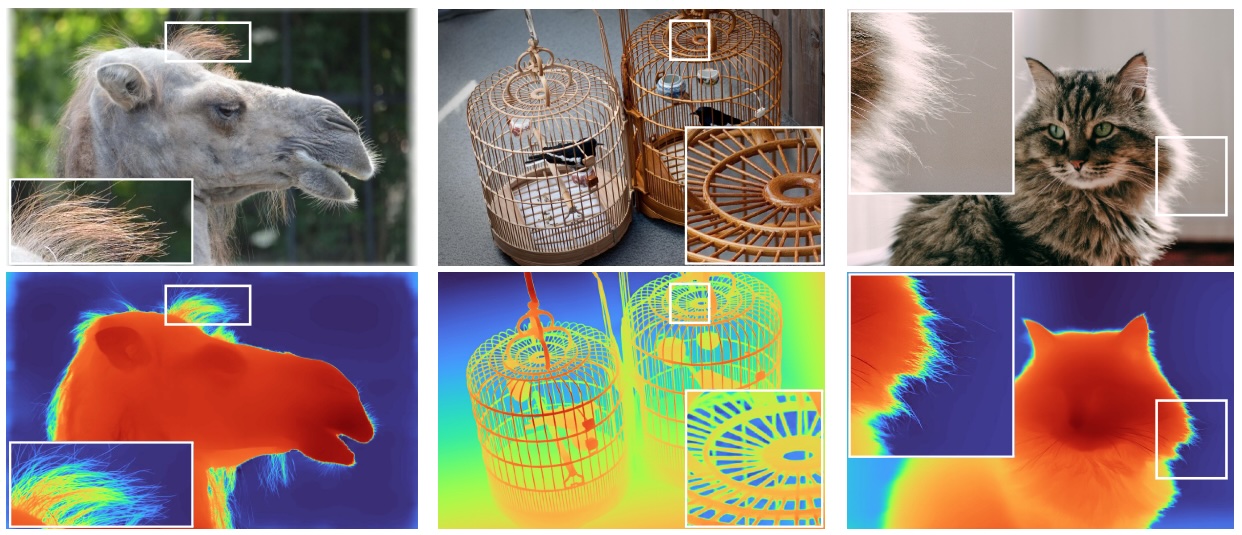 DepthPro Outputs. Taken from the official code.
使用技巧
DepthPro 模型首先对输入图像进行多尺度下采样,并将每个缩放后的版本分割为图像块。随后,这些图像块通过共享的基于 Vision Transformer (ViT) 的 Dinov2 图像块编码器进行编码,而完整图像则由一个独立的图像编码器处理。提取出的图像块特征被合并为特征图,经过上采样后,使用类似 DPT 的解码器进行融合,以生成最终的深度估计。如果启用,额外的视场角 (FOV) 编码器会处理图像以估计相机的视场角,从而辅助提升深度精度。
import requests
import torch
from PIL import Image

from transformers import DepthProForDepthEstimation, DepthProImageProcessor


url = 'http://images.cocodataset.org/val2017/000000039769.jpg'
image = Image.open(requests.get(url, stream=True).raw)

image_processor = DepthProImageProcessor.from_pretrained("apple/DepthPro-hf")
model = DepthProForDepthEstimation.from_pretrained("apple/DepthPro-hf", device_map="auto")

inputs = image_processor(images=image, return_tensors="pt").to(model.device)

with torch.no_grad():
    outputs = model(**inputs)

post_processed_output = image_processor.post_process_depth_estimation(
    outputs, target_sizes=[(image.height, image.width)],
)

field_of_view = post_processed_output[0]["field_of_view"]
focal_length = post_processed_output[0]["focal_length"]
depth = post_processed_output[0]["predicted_depth"]
depth = (depth - depth.min()) / depth.max()
depth = depth * 255.
depth = depth.detach().cpu().numpy()
depth = Image.fromarray(depth.astype("uint8"))
架构与配置
 DepthPro architecture. Taken from the original paper.
DepthProForDepthEstimation 模型使用 DepthProEncoder 对输入图像进行编码,并使用 FeatureFusionStage 融合编码器输出的特征。
DepthProEncoder 进一步使用了两个编码器:
patch_encoder- 输入图像会根据
scaled_images_ratios配置中指定的多个比例进行缩放。 - 每张缩放后的图像会被分割为更小的 patch,其大小为
patch_size,重叠区域由scaled_images_overlap_ratios决定。 - 这些补丁由
patch_encoder进行处理
- 输入图像会根据
image_encoder- 输入图像也会被重新缩放至
patch_size,并由image_encoder进行处理。
- 输入图像也会被重新缩放至
这两个编码器可以分别通过 patch_model_config 和 image_model_config 进行配置,默认情况下,它们都是独立的 Dinov2Model。
两个编码器(last_hidden_state)的输出以及从 patch_encoder 中选定的中间状态(hidden_states)会通过基于 DPT 的 FeatureFusionStage 进行融合,以用于深度估计。
视场(FOV)预测
该网络补充了一个焦距估计头。一个小型卷积头接收来自深度估计网络的冻结特征以及来自独立 ViT 图像编码器的任务特定特征,以预测水平角视场。
DepthProConfig 中的 use_fov_model 参数用于控制是否启用 FOV 预测。默认情况下,该参数设置为 False,以节省内存和计算资源。启用后,FOV 编码器 将根据 fov_model_config 参数进行实例化,该参数默认为 Dinov2Model。在初始化 DepthProForDepthEstimation 模型时,也可以传入 use_fov_model 参数。
检查点 apple/DepthPro-hf 处的预训练模型使用了 FOV 编码器。若要在不使用 FOV 编码器的情况下使用该预训练模型,请在加载模型时设置 use_fov_model=False,这样可以节省计算资源。
from transformers import DepthProForDepthEstimation


model = DepthProForDepthEstimation.from_pretrained("apple/DepthPro-hf", use_fov_model=False, device_map="auto")
要实例化一个带有 FOV 编码器的新模型,请在配置中设置 use_fov_model=True。
from transformers import DepthProConfig, DepthProForDepthEstimation


config = DepthProConfig(use_fov_model=True)
model = DepthProForDepthEstimation(config)
或者在初始化模型时设置 use_fov_model=True,这将覆盖 config 中的值。
from transformers import DepthProConfig, DepthProForDepthEstimation


config = DepthProConfig()
model = DepthProForDepthEstimation(config, use_fov_model=True)
使用缩放点积注意力(SDPA)
PyTorch 在 torch.nn.functional 中包含了原生的缩放点积注意力(SDPA)算子。该函数涵盖了多种实现方式,可根据输入和所用硬件进行应用。有关更多信息,请参阅官方文档或GPU 推理页面。
当存在可用实现时,torch>=2.1.1 默认使用 SDPA,但您也可以在 from_pretrained() 中设置 attn_implementation="sdpa" 以显式请求使用 SDPA。
from transformers import DepthProForDepthEstimation


model = DepthProForDepthEstimation.from_pretrained("apple/DepthPro-hf", attn_implementation="sdpa", device_map="auto")
为了获得最佳加速效果,我们建议以半精度(例如 torch.float16 或 torch.bfloat16)加载模型。
在本地基准测试(A100-40GB、PyTorch 2.3.0、操作系统 Ubuntu 22.04)中,使用 float32 和 google/vit-base-patch16-224 模型,我们在推理过程中观察到以下加速效果。
| 批处理大小 | 平均推理时间(毫秒),eager 模式 | 平均推理时间(毫秒),sdpa 模型 | 加速,Sdpa / Eager (x) |
|---|---|---|---|
| 1 | 7 | 6 | 1.17 |
| 2 | 8 | 6 | 1.33 |
| 4 | 8 | 6 | 1.33 |
| 8 | 8 | 6 | 1.33 |
资源
以下是官方的 Hugging Face 和社区(以 🌎 标识)资源列表,可帮助您快速上手 DepthPro:
- 研究论文:Depth Pro: Sharp Monocular Metric Depth in Less Than a Second
- 官方实现:apple/ml-depth-pro
- DepthPro 推理 Notebook:DepthPro 推理
- 用于超分辨率与图像分割的 DepthPro
- 阅读 Medium 上的博客:Depth Pro:超越深度
- Github 上的代码:geetu040/depthpro-beyond-depth
如果您有兴趣提交资源以收录在此处,请随时发起 Pull Request,我们将对其进行审核!理想情况下,该资源应展示一些新内容,而不是重复现有资源。
DepthProConfig
class transformers.DepthProConfig
< source >( transformers_version: str | None = Nonearchitectures: list[str] | None = Noneoutput_hidden_states: bool | None = Falsereturn_dict: bool | None = Truedtype: str | torch.dtype | None = Nonechunk_size_feed_forward: int = 0is_encoder_decoder: bool = Falseid2label: dict[int, str] | dict[str, str] | None = Nonelabel2id: dict[str, int] | dict[str, str] | None = Noneproblem_type: Literal['regression', 'single_label_classification', 'multi_label_classification'] | None = Nonefusion_hidden_size: int = 256patch_size: int | list[int] | tuple[int, int] = 384initializer_range: float = 0.02intermediate_hook_ids: list[int] | tuple[int, ...] = (11, 5)intermediate_feature_dims: list[int] | tuple[int, ...] = (256, 256)scaled_images_ratios: list[int | float] | tuple[int | float, ...] = (0.25, 0.5, 1)scaled_images_overlap_ratios: list[float] | tuple[float, ...] = (0.0, 0.5, 0.25)scaled_images_feature_dims: list[int] | tuple[int, ...] = (1024, 1024, 512)merge_padding_value: int = 3use_batch_norm_in_fusion_residual: bool = Falseuse_bias_in_fusion_residual: bool = Trueuse_fov_model: bool = Falsenum_fov_head_layers: int = 2image_model_config: dict | transformers.configuration_utils.PreTrainedConfig | None = Nonepatch_model_config: dict | transformers.configuration_utils.PreTrainedConfig | None = Nonefov_model_config: dict | transformers.configuration_utils.PreTrainedConfig | None = None )
参数
- fusion_hidden_size (
int,可选,默认为 256) — 融合前的通道数。 - patch_size (
Union[int, list[int], tuple[int, int]],可选,默认为384) — 每个 patch 的大小(分辨率)。 - initializer_range (
float,可选,默认为0.02) — 用于初始化所有权重矩阵的 truncated_normal_initializer 的标准差。 - intermediate_hook_ids (
list[int],可选,默认为[11, 5]) — 用于融合的来自 patch encoder 的中间隐藏状态的索引。 - intermediate_feature_dims (
list[int],可选,默认为[256, 256]) —intermediate_hook_ids中每个中间隐藏状态在上采样过程中的隐藏状态维度。 - scaled_images_ratios (
list[float],可选,默认为[0.25, 0.5, 1]) — 供 patch encoder 使用的缩放图像比例。 - scaled_images_overlap_ratios (
list[float],可选,默认为[0.0, 0.5, 0.25]) —scaled_images_ratios中每个缩放图像之间补丁的重叠比例。 - scaled_images_feature_dims (
list[int],可选,默认为[1024, 1024, 512]) —scaled_images_ratios中每个缩放图像在上采样过程中的隐藏状态维度。 - merge_padding_value (
int,可选,默认为 3) — 在将较小的 patch 合并回图像尺寸时,会移除该大小的重叠区域。 - use_batch_norm_in_fusion_residual (
bool,可选,默认为False) — 是否在融合块的预激活残差单元中使用批归一化。 - use_bias_in_fusion_residual (
bool,可选,默认为True) — 是否在融合块的前激活残差单元中使用偏置。 - use_fov_model (
bool,可选,默认为False) — 是否使用DepthProFovModel来生成视场。 - num_fov_head_layers (
int,可选,默认为 2) —DepthProFovModel头部中的卷积层数。 - image_model_config (
Union[dict[str, Any], PreTrainedConfig], 可选) — 图像编码器模型的配置,通过 AutoModel API 加载。 默认使用 Dinov2 模型作为骨干网络。 - patch_model_config (
Union[dict[str, Any], PreTrainedConfig], 可选) — Patch 编码器模型的配置,通过 AutoModel API 加载。 默认使用 Dinov2 模型作为骨干网络。 - fov_model_config (
Union[dict[str, Any], PreTrainedConfig], 可选) — fov 编码器模型的配置,通过 AutoModel API 加载。 默认使用 Dinov2 模型作为骨干网络。
这是用于存储 DepthProModel 配置的类。它根据指定的参数实例化 Depth Pro 模型,并定义模型架构。使用默认值实例化配置将得到与 apple/DepthPro 类似的配置。
配置对象继承自 PreTrainedConfig,可用于控制模型输出。有关更多信息,请参阅 PreTrainedConfig 的文档。
示例:
>>> from transformers import DepthProConfig, DepthProModel

>>> # Initializing a DepthPro apple/DepthPro style configuration
>>> configuration = DepthProConfig()

>>> # Initializing a model (with random weights) from the apple/DepthPro style configuration
>>> model = DepthProModel(configuration)

>>> # Accessing the model configuration
>>> configuration = model.config
DepthProImageProcessor
class transformers.DepthProImageProcessor
< source >( **kwargs: *<class 'transformers.processing_utils.ImagesKwargs'> )
参数
- do_convert_rgb (
bool,kwargs,可选) — 是否将图像转换为 RGB。 - do_resize (
bool,kwargs,可选,默认为True) — 是否调整图像大小。 - size (
Annotated[int | list[int] | tuple[int, ...] | dict[str, int] | None, None], kwargs,默认为{'height' -- 1536, 'width': 1536}): 描述输入到模型的最大尺寸。 - default_to_square (
bool,kwargs,可选,默认为True) — 当 size 为 int 时,是否在调整大小时默认使用正方形图像。 - crop_size (
Annotated[int | list[int] | tuple[int, ...] | dict[str, int] | None, None], kwargs) — 应用center_crop后输出图像的尺寸。 - resample (
Annotated[Union[int, PILImageResampling, NoneType], None], kwargs,默认为2) — 如果调整图像大小,则使用的重采样滤波器。它可以是枚举PILImageResampling中的一个值。仅当do_resize设置为True时才会生效。 - do_rescale (
bool,kwargs,可选,默认为True) — 是否对图像进行重新缩放。 - rescale_factor (
float,kwargs,可选,默认为0.00392156862745098) — 当do_rescale设置为True时,用于对图像进行缩放的缩放因子。 - do_normalize (
bool,kwargs,可选,默认为True) — 是否对图像进行归一化。 - image_mean (
Union[float, list[float], tuple[float, ...]],kwargs,可选,默认为[0.5, 0.5, 0.5]) — 用于归一化的图像均值。仅当do_normalize设置为True时生效。 - image_std (
Union[float, list[float], tuple[float, ...]],kwargs,可选,默认为[0.5, 0.5, 0.5]) — 用于归一化的图像标准差。仅当do_normalize设置为True时生效。 - do_pad (
bool, kwargs, 可选) — 是否对图像进行填充。填充操作会将图像填充至批次中的最大尺寸,或填充至每张图像的固定正方形尺寸。具体的填充策略取决于模型。 - pad_size (
Annotated[int | list[int] | tuple[int, ...] | dict[str, int] | None, None], kwargs) — 用于填充图像的{"height": int, "width" int}尺寸。必须大于为预处理提供的任何图像尺寸。如果未提供pad_size,图像将被填充到批次中最大的高度和宽度。仅在do_pad=True.时应用。 - do_center_crop (
bool,kwargs,可选) — 是否对图像进行中心裁剪。 - data_format (
Union[str, ~image_utils.ChannelDimension], kwargs, 可选) — 仅支持ChannelDimension.FIRST。为兼容旧版处理器而添加。 - input_data_format (
Union[str, ~image_utils.ChannelDimension], kwargs, 可选) — 输入图像的通道维度格式。如果未设置,则从输入图像中推断通道维度格式。可以是以下之一:"channels_first"或ChannelDimension.FIRST:图像采用 (num_channels, height, width) 格式。"channels_last"或ChannelDimension.LAST:图像采用 (height, width, num_channels) 格式。"none"或ChannelDimension.NONE:图像为 (height, width) 格式。
- device (
Annotated[Union[str, torch.device, NoneType], None], kwargs) — 用于处理视频的设备。如果未设置,则从输入视频中推断设备。 - return_tensors (
Annotated[str | ~utils.generic.TensorType | None, None], kwargs) — 如果设置为'pt',则返回堆叠的张量,否则返回张量列表。 - disable_grouping (
bool,kwargs,可选) — 是否禁用按尺寸对图像进行分组,从而逐个处理图像而非批量处理。 如果为 None,则当图像位于 CPU 上时设置为 True,否则设置为 False。此选择基于经验观察,详见此处:https://github.com/huggingface/transformers/pull/38157 - image_seq_length (
int, kwargs, optional) — 输入中每张图片所使用的图像 token 数量。 为向后兼容而添加,但在未来的模型中应将其设置为处理器属性。 如果设置为'pt',则返回堆叠的张量,否则返回张量列表。 - disable_grouping (
bool,kwargs,可选) — 是否禁用按尺寸对图像进行分组,从而逐个处理图像而非批量处理。 如果为 None,则当图像位于 CPU 上时设置为 True,否则设置为 False。此选择基于经验观察,详见此处:https://github.com/huggingface/transformers/pull/38157 - image_seq_length (
int,kwargs,可选) — 输入中每张图片所使用的图像 token 数量。 为向后兼容而添加,但在未来的模型中,应将其设置为处理器的属性。 - Returns 如果设置为
'pt',则返回堆叠的张量,否则返回张量列表。 —
构建 DepthPro 图像处理器。
disable_grouping (bool, kwargs, 可选):
是否禁用按尺寸对图像进行分组,从而逐个处理图像而非批量处理。
如果为 None,则当图像位于 CPU 上时设置为 True,否则设置为 False。此选择基于经验观察,详情见此处:https://github.com/huggingface/transformers/pull/38157 image_seq_length (int, kwargs, 可选):
输入中每张图像所使用的图像 token 数量。
为向后兼容而添加,但在未来的模型中应将其设置为处理器属性。
预处理
< source >( images: typing.Union[ForwardRef('PIL.Image.Image'), numpy.ndarray, ForwardRef('torch.Tensor'), list['PIL.Image.Image'], list[numpy.ndarray], list['torch.Tensor']]*argsimage_like_kwargs: dict[str, typing.Any] | None = None**kwargs: *<class 'transformers.processing_utils.ImagesKwargs'> ) → ~image_processing_base.BatchFeature
参数
- images (
Union[PIL.Image.Image, numpy.ndarray, torch.Tensor, list[PIL.Image.Image], list[numpy.ndarray], list[torch.Tensor]]) — 要预处理的图像。期望输入单张图像或一批图像,其像素值范围为 0 到 255。如果传入的图像像素值在 0 到 1 之间,请设置do_rescale=False。 - image_like_kwargs (
dict[str, Any], 可选) — 用于额外图像类输入的开发者标志,这些输入也将被预处理。仅在以关键字参数传递输入不起作用时使用此标志。例如,preprocess(images, masks=masks)是首选方式,但对于某些模型会导致参数优先级问题。在这种情况下,可以改用preprocess(images, image_like_inputs={"masks": masks})。 - do_convert_rgb (
bool,kwargs,可选) — 是否将图像转换为 RGB。 - do_resize (
bool,kwargs,可选) — 是否调整图像大小。 - size (
Annotated[int | list[int] | tuple[int, ...] | dict[str, int] | None, None], kwargs) — 描述模型的最大输入维度。 - default_to_square (
bool, kwargs, 可选) — 当 size 为整数时,是否在调整大小时默认使用正方形图像。 - crop_size (
Annotated[int | list[int] | tuple[int, ...] | dict[str, int] | None, None], kwargs) — 应用center_crop后输出图像的尺寸。 - resample (
Annotated[Union[int, PILImageResampling, NoneType], None], kwargs) — 如果调整图像大小,则使用的重采样滤波器。可以是枚举PILImageResampling中的一个值。仅当do_resize设置为True时生效。 - do_rescale (
bool,kwargs,可选) — 是否对图像进行重新缩放。 - rescale_factor (
float, kwargs, 可选) — 如果do_rescale设置为True,则用于对图像进行缩放的缩放因子。 - do_normalize (
bool,kwargs,可选) — 是否对图像进行归一化。 - image_mean (
Union[float, list[float], tuple[float, ...]], kwargs, 可选) — 用于归一化的图像均值。仅当do_normalize设置为True时生效。 - image_std (
Union[float, list[float], tuple[float, ...]], kwargs, 可选) — 用于归一化的图像标准差。仅当do_normalize设置为True时生效。 - do_pad (
bool, kwargs, 可选) — 是否对图像进行填充。填充操作会将图像填充至批次中的最大尺寸,或填充至每张图像的固定正方形尺寸。具体的填充策略取决于模型。 - pad_size (
Annotated[int | list[int] | tuple[int, ...] | dict[str, int] | None, None], kwargs) — 用于填充图像的{"height": int, "width" int}尺寸。必须大于为预处理提供的任何图像尺寸。如果未提供pad_size,图像将被填充到批次中最大的高度和宽度。仅在do_pad=True.时应用。 - do_center_crop (
bool,kwargs,可选) — 是否对图像进行中心裁剪。 - data_format (
Union[str, ~image_utils.ChannelDimension], kwargs, 可选) — 仅支持ChannelDimension.FIRST。为兼容旧版处理器而添加。 - input_data_format (
Union[str, ~image_utils.ChannelDimension], kwargs, 可选) — 输入图像的通道维度格式。如果未设置,则从输入图像中推断通道维度格式。可以是以下之一:"channels_first"或ChannelDimension.FIRST:图像采用 (num_channels, height, width) 格式。"channels_last"或ChannelDimension.LAST:图像采用 (height, width, num_channels) 格式。"none"或ChannelDimension.NONE:图像为 (height, width) 格式。
- device (
Annotated[Union[str, torch.device, NoneType], None], kwargs) — 用于处理视频的设备。如果未设置,则从输入视频中推断设备。 - return_tensors (
Annotated[str | ~utils.generic.TensorType | None, None], kwargs) — 如果设置为'pt',则返回堆叠的张量,否则返回张量列表。 - disable_grouping (
bool,kwargs,可选) — 是否禁用按尺寸对图像进行分组,从而逐个处理图像而非批量处理。 如果为 None,则当图像位于 CPU 上时设置为 True,否则设置为 False。此选择基于经验观察,详见此处:https://github.com/huggingface/transformers/pull/38157 - image_seq_length (
int,kwargs,可选) — 输入中每张图片所使用的图像 token 数量。 为向后兼容而添加,但在未来的模型中,应将其设置为处理器的属性。
返回值
~image_processing_base.BatchFeature
- data (
dict) — 由 call 方法返回的列表/数组/张量字典(如 ‘pixel_values’ 等)。 - tensor_type (
Union[None, str, TensorType], 可选) — 您可以在此处指定 tensor_type,以便在初始化时将 PyTorch/Numpy 张量中的整数列表进行转换。
预处理一张图像或一批图像。
post_process_depth_estimation
< source >( outputs: DepthProDepthEstimatorOutputtarget_sizes: transformers.utils.generic.TensorType | list[tuple[int, int]] | None = None )
对模型输出的原始深度预测结果进行后处理。
DepthProModel
class transformers.DepthProModel
< source >( config: DepthProConfig )
参数
- config (DepthProConfig) — 模型的配置类,包含模型的所有参数。使用配置文件进行初始化时,不会加载与模型关联的权重,仅加载配置。请查看 from_pretrained() 方法以加载模型权重。
未添加任何特定头部的裸 Depth Pro 模型,直接输出原始隐藏状态。
该模型继承自 PreTrainedModel。请查阅父类文档,了解该库为所有模型实现的通用方法(例如下载或保存、调整输入嵌入大小、剪枝头等)。
该模型也是 PyTorch torch.nn.Module 的子类。 请将其作为常规的 PyTorch Module 使用,有关通用用法和行为的所有事项,请参阅 PyTorch 文档。
forward
< source >( pixel_values: Tensoroutput_attentions: bool | None = Noneoutput_hidden_states: bool | None = Nonereturn_dict: bool | None = None**kwargs ) → DepthProOutput or tuple(torch.Tensor)
参数
- pixel_values (
torch.Tensor,形状为(batch_size, num_channels, image_size, image_size)) — 与输入图像对应的张量。可以使用 DepthProImageProcessor 获取像素值。有关详细信息,请参阅 DepthProImageProcessor.call()(processor_class使用 DepthProImageProcessor 处理图像)。 - output_attentions (
bool, 可选) — 是否返回所有注意力层的注意力张量。有关详细信息,请参阅返回张量中的attentions。 - output_hidden_states (
bool,可选) — 是否返回所有层的隐藏状态。有关更多详细信息,请参阅返回张量中的hidden_states。 - return_dict (
bool, 可选) — 是否返回 ModelOutput 而不是普通元组。
返回值
DepthProOutput 或 tuple(torch.Tensor)
DepthProOutput 或 torch.Tensor 元组(当传入 return_dict=False 或 config.return_dict=False 时),包含根据配置(DepthProConfig)和输入而定的各种元素。
DepthProModel 的 forward 方法重写了 __call__ 特殊方法。
尽管前向传播的实现需要在此函数中定义,但之后应调用
Module实例,而不是直接调用此函数,因为前者会负责执行预处理和后处理步骤,而后者则会静默地忽略这些步骤。
last_hidden_state(形状为
(batch_size, n_patches_per_batch, sequence_length, hidden_size)的torch.Tensor)— 模型最后一层输出的隐藏状态序列。features (
Union[torch.Tensor, List[torch.Tensor]],可选) — 来自编码器的特征。可以是单个特征或特征列表。hidden_states (
tuple[torch.Tensor, ...],可选,当传入output_hidden_states=True或config.output_hidden_states=True时返回) — 一个torch.Tensor元组(如果模型具有嵌入层,则包含嵌入层输出的一个张量,以及每个层输出的一个张量),形状为(batch_size, sequence_length, hidden_size)。模型在每一层输出处的隐藏状态,以及可选的初始嵌入输出。
attentions (
tuple[torch.Tensor, ...],可选,当传入output_attentions=True或config.output_attentions=True时返回) — 一个torch.Tensor元组(每层一个),形状为(batch_size, num_heads, sequence_length, sequence_length)。注意力权重,即经过注意力 softmax 之后的权重,用于在自注意力头中计算加权平均值。
示例:
>>> import torch
>>> from PIL import Image
>>> from huggingface_hub.utils import httpx
>>> from io import BytesIO
>>> from transformers import AutoProcessor, DepthProModel

>>> url = "https://www.ilankelman.org/stopsigns/australia.jpg"
>>> with httpx.stream("GET", url) as response:
...     image = Image.open(BytesIO(response.read()))

>>> checkpoint = "apple/DepthPro-hf"
>>> processor = AutoProcessor.from_pretrained(checkpoint)
>>> model = DepthProModel.from_pretrained(checkpoint)

>>> # prepare image for the model
>>> inputs = processor(images=image, return_tensors="pt")

>>> with torch.no_grad():
...     output = model(**inputs)

>>> output.last_hidden_state.shape
torch.Size([1, 35, 577, 1024])
DepthProForDepthEstimation
class transformers.DepthProForDepthEstimation
< source >( config: DepthProConfiguse_fov_model = None )
参数
- config (DepthProConfig) — 模型的配置类,包含模型的所有参数。使用配置文件进行初始化时,不会加载与模型关联的权重,仅加载配置。请查看 from_pretrained() 方法以加载模型权重。
- use_fov_model (
bool,可选) — 是否使用视场模型。
带有深度估计头(由 3 个卷积层组成)的 DepthPro 模型。
该模型继承自 PreTrainedModel。请查阅父类文档,了解该库为所有模型实现的通用方法(例如下载或保存、调整输入嵌入大小、剪枝头等)。
该模型也是 PyTorch torch.nn.Module 的子类。 请将其作为常规的 PyTorch Module 使用,有关通用用法和行为的所有事项,请参阅 PyTorch 文档。
forward
< source >( pixel_values: Tensorlabels: typing.Optional[torch.LongTensor] = Noneoutput_attentions: bool | None = Noneoutput_hidden_states: bool | None = Nonereturn_dict: bool | None = None**kwargs ) → DepthProDepthEstimatorOutput or tuple(torch.Tensor)
参数
- pixel_values (
torch.Tensor,形状为(batch_size, num_channels, image_size, image_size)) — 与输入图像对应的张量。可以使用 DepthProImageProcessor 获取像素值。有关详细信息,请参阅 DepthProImageProcessor.call()(processor_class使用 DepthProImageProcessor 处理图像)。 - labels(形状为
(batch_size, height, width)的torch.LongTensor,可选) — 用于计算损失的真实深度估计图。 - output_attentions (
bool, 可选) — 是否返回所有注意力层的注意力张量。有关详细信息,请参阅返回张量中的attentions。 - output_hidden_states (
bool,可选) — 是否返回所有层的隐藏状态。有关更多详细信息,请参阅返回张量中的hidden_states。 - return_dict (
bool, 可选) — 是否返回 ModelOutput 而不是普通元组。
返回值
DepthProDepthEstimatorOutput 或 tuple(torch.Tensor)
DepthProDepthEstimatorOutput 或 torch.Tensor 元组(如果传入 return_dict=False 或 config.return_dict=False),其包含的元素取决于配置(DepthProConfig)和输入。
DepthProForDepthEstimation 的 forward 方法重写了 __call__ 特殊方法。
尽管前向传播的实现需要在此函数中定义,但之后应调用
Module实例,而不是直接调用此函数,因为前者会负责执行预处理和后处理步骤,而后者则会静默地忽略这些步骤。
loss (
torch.Tensor,形状为(1,),可选,当提供labels时返回) — 分类损失(如果 config.num_labels==1,则为回归损失)。predicted_depth(形状为
(batch_size, height, width)的torch.Tensor,可选)— 每个像素的预测深度。field_of_view(形状为
(batch_size,)的torch.Tensor,可选,在提供use_fov_model时返回)— 视场缩放器。hidden_states (
tuple[torch.Tensor, ...],可选,当传入output_hidden_states=True或config.output_hidden_states=True时返回) — 一个torch.Tensor元组(如果模型具有嵌入层,则包含嵌入层输出的一个张量,以及每个层输出的一个张量),形状为(batch_size, sequence_length, hidden_size)。模型在每一层输出处的隐藏状态,以及可选的初始嵌入输出。
attentions (
tuple[torch.Tensor, ...],可选,当传入output_attentions=True或config.output_attentions=True时返回) — 一个torch.Tensor元组(每层一个),形状为(batch_size, num_heads, sequence_length, sequence_length)。注意力权重,即经过注意力 softmax 之后的权重,用于在自注意力头中计算加权平均值。
示例:
>>> from transformers import AutoImageProcessor, DepthProForDepthEstimation
>>> import torch
>>> from PIL import Image
>>> from huggingface_hub.utils import httpx
>>> from io import BytesIO

>>> url = "http://images.cocodataset.org/val2017/000000039769.jpg"
>>> with httpx.stream("GET", url) as response:
...     image = Image.open(BytesIO(response.read()))

>>> checkpoint = "apple/DepthPro-hf"
>>> processor = AutoImageProcessor.from_pretrained(checkpoint)
>>> model = DepthProForDepthEstimation.from_pretrained(checkpoint)

>>> device = torch.device("cuda" if torch.cuda.is_available() else "cpu")
>>> model.to(device)

>>> # prepare image for the model
>>> inputs = processor(images=image, return_tensors="pt").to(device)

>>> with torch.no_grad():
...     outputs = model(**inputs)

>>> # interpolate to original size
>>> post_processed_output = processor.post_process_depth_estimation(
...     outputs, target_sizes=[(image.height, image.width)],
... )

>>> # get the field of view (fov) predictions
>>> field_of_view = post_processed_output[0]["field_of_view"]
>>> focal_length = post_processed_output[0]["focal_length"]

>>> # visualize the prediction
>>> predicted_depth = post_processed_output[0]["predicted_depth"]
>>> depth = predicted_depth * 255 / predicted_depth.max()
>>> depth = depth.detach().cpu().numpy()
>>> depth = Image.fromarray(depth.astype("uint8"))