

Thank you for sharing

Hi Thomas,
thank you for sharing the LoRA and Settings for AI-Toolkit.
I wonder, if you could give good advice to me, because I tried to train a similar LoRA with the Ostris Template for qwen-image-edit-plus:
I tried to train photorealism, but I failed (tried 2 times with 14.000 steps)
For datasets I had a similar approach:
target I used real photos (but quite not to "dirty", as skin detail was not my primary goal (but realism)).
as control, I used qwen to denoise thes picts (140) till they looked quite syntetic.
But when training, Qwen would not learn this difference.
I trained Rank 32, only 1024px square, and for the rest more or less like your shared settings. I trained on 6000 pro on Rundpod (and burned quite some money)
I am photographer, so I used my own material for training.
Any Ideas?
Hi
@DerBobby
1: I had an issue with AIToolkit at first where both dataset paths reset to be the same path. EG my control dataset and target dataset path reverted to BOTH being my target dataset path.
Did this happen you? It would explain why it's not learning a difference if this bug occurred for you.
2: Did you use the most recent version of AI Toolkit repo? I used commit: c6edd71 , you can switch to this commit by using the git command: git reset --hard c6edd71
3: It might be worth trying on a small dataset of 30 images or so for 1-2k steps just to see if any changes to your settings work better. If you share your full config I can try take a look
Hi Thomas,
thanks for your good ideas.
I used the official preset from Ostris on Runpod, so I did not have a chance to change that much.
I don't think though, that the 2 datasets were mixed, because I had trained another LoRA which worked.
So I think I can exclude 1.
For 2, "commit" I don't know.
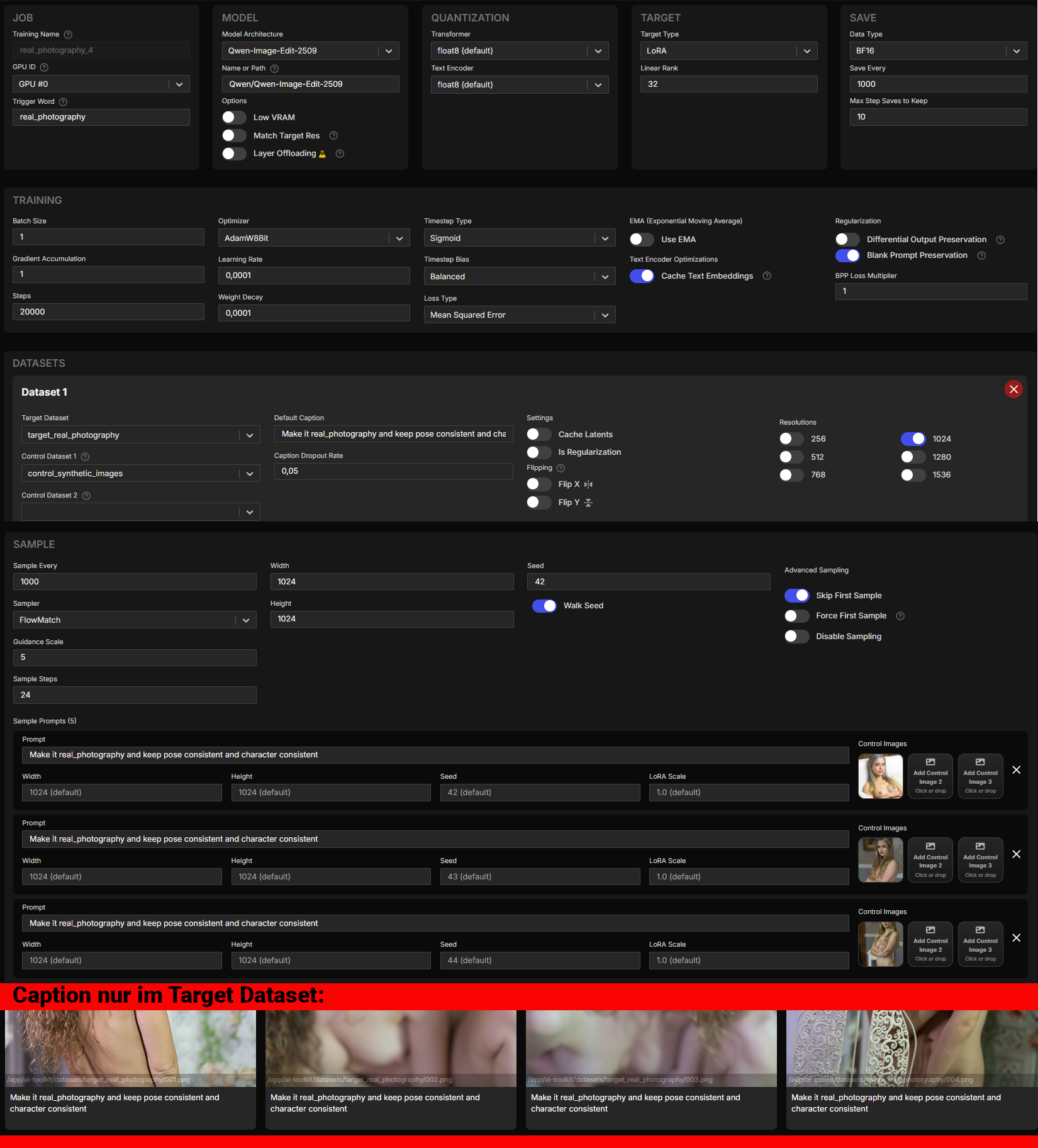
job: "extension"
config:
name: "real_photography_4"
process:
- type: "diffusion_trainer"
training_folder: "/app/ai-toolkit/output"
sqlite_db_path: "./aitk_db.db"
device: "cuda"
trigger_word: "real_photography"
performance_log_every: 10
network:
type: "lora"
linear: 32
linear_alpha: 32
conv: 16
conv_alpha: 16
lokr_full_rank: true
lokr_factor: -1
network_kwargs:
ignore_if_contains: []
save:
dtype: "bf16"
save_every: 1000
max_step_saves_to_keep: 10
save_format: "diffusers"
push_to_hub: false
datasets:
- folder_path: "/app/ai-toolkit/datasets/target_real_photography"
mask_path: null
mask_min_value: 0.1
default_caption: "Make it real_photography and keep pose consistent and character consistent"
caption_ext: "txt"
caption_dropout_rate: 0.05
cache_latents_to_disk: false
is_reg: false
network_weight: 1
resolution:
- 1024
controls: []
shrink_video_to_frames: true
num_frames: 1
do_i2v: true
flip_x: false
flip_y: false
control_path_1: "/app/ai-toolkit/datasets/control_synthetic_images"
control_path_2: null
control_path_3: null
train:
batch_size: 1
bypass_guidance_embedding: false
steps: 20000
gradient_accumulation: 1
train_unet: true
train_text_encoder: false
gradient_checkpointing: true
noise_scheduler: "flowmatch"
optimizer: "adamw8bit"
timestep_type: "sigmoid"
content_or_style: "balanced"
optimizer_params:
weight_decay: 0.0001
unload_text_encoder: false
cache_text_embeddings: true
lr: 0.0001
ema_config:
use_ema: false
ema_decay: 0.99
skip_first_sample: true
force_first_sample: false
disable_sampling: false
dtype: "bf16"
diff_output_preservation: false
diff_output_preservation_multiplier: 1
diff_output_preservation_class: "person"
switch_boundary_every: 1
loss_type: "mse"
blank_prompt_preservation: true
model:
name_or_path: "Qwen/Qwen-Image-Edit-2509"
quantize: true
qtype: "qfloat8"
quantize_te: true
qtype_te: "qfloat8"
arch: "qwen_image_edit_plus"
low_vram: false
model_kwargs:
match_target_res: false
layer_offloading: false
layer_offloading_text_encoder_percent: 1
layer_offloading_transformer_percent: 1
sample:
sampler: "flowmatch"
sample_every: 1000
width: 1024
height: 1024
samples:
- prompt: "Make it real_photography and keep pose consistent and character consistent"
ctrl_img_1: "/app/ai-toolkit/data/images/08db9426-497e-49e4-a96a-6017c09c75ef.png"
- prompt: "Make it real_photography and keep pose consistent and character consistent"
ctrl_img_1: "/app/ai-toolkit/data/images/a769fb7d-188a-440a-9366-d1dfbfdb4cb2.png"
- prompt: "Make it real_photography and keep pose consistent and character consistent"
ctrl_img_1: "/app/ai-toolkit/data/images/a9c57d4f-5f30-4716-b7c9-48cbc46157ef.png"
- prompt: "Make it real_photography and keep pose consistent and character consistent"
ctrl_img_1: "/app/ai-toolkit/data/images/597f14a6-7af3-40bf-ab43-b47a6f73ccfa.png"
- prompt: "Make it real_photography and keep pose consistent and character consistent"
ctrl_img_1: "/app/ai-toolkit/data/images/8d664b83-4610-4e38-be29-312e60e09a35.png"
neg: ""
seed: 42
walk_seed: true
guidance_scale: 5
sample_steps: 24
num_frames: 1
fps: 1
meta:
name: "[name]"
version: "1.0"
I got the impression, that the model does not "understand" the fine difference in the picts.
@DerBobby it would be worth trying some tweaks on the config to see if training improves, but start a fresh training , don't resume.
linear=16, linear_alpha=16, your value of 32 might be too much
capacity for learning a vague concept like "real photography" but im
not fully sure if it will change muchI used multiple resolution images in my dataset, it might not have
much of an effect for you but it could be worth trying
multi-resolution even not just for your training itself, but for the
final model to have better generalization across other users input
image resTry without a trigger word, maybe just leave out trigger word. Also are you trying to go from Anime to Real or from some other style to Real? I think the caption might be too generic, if you were changing from a Style to Realistic, then I'd try something more like :
- Change the style from Anime (Or your style) to a real photograph, keep the pose and character consistent
I started from something much closer than "anime". I srtarted from Qwen-Look (syntetic typical AI-image). But as AI thinks that this is allready photorealistic, it does not understand the change.
I am thinking about training LoRAs with only 1 dataset for Qwen-Image (instead of the Edit-Version). I know that people say, quality would suffer if you use it on QIE (2025), but I have seen some effects with existing LoRAs, that are working perfectly.
Anyway I would like to hol contact for exchanging experiances.